Compare commits
No commits in common. "doc-markup-fix" and "main" have entirely different histories.
doc-markup
...
main
|
|
@ -8,4 +8,3 @@ exclude_lines =
|
|||
if __name__ == "__main__":
|
||||
@overload
|
||||
__rich_repr__
|
||||
@abstractmethod
|
||||
|
|
|
|||
|
|
@ -1,7 +0,0 @@
|
|||
version = 1
|
||||
|
||||
[[analyzers]]
|
||||
name = "python"
|
||||
|
||||
[analyzers.meta]
|
||||
runtime_version = "3.x.x"
|
||||
15
.faq/FAQ.md
|
|
@ -1,17 +1,12 @@
|
|||
---
|
||||
hide:
|
||||
- navigation
|
||||
---
|
||||
|
||||
<!-- Auto-generated by FAQtory -->
|
||||
<!-- Do not edit by hand! -->
|
||||
|
||||
# Frequently Asked Questions
|
||||
|
||||
{%- for question in questions %}
|
||||
- [{{ question.title }}](#{{ question.slug }})
|
||||
{%- endfor %}
|
||||
|
||||
Welcome to the Textual FAQ.
|
||||
Here we try and answer any question that comes up frequently.
|
||||
If you can't find what you are looking for here, see our other [help](./help.md) channels.
|
||||
|
||||
{%- for question in questions %}
|
||||
|
||||
|
|
@ -20,8 +15,8 @@ If you can't find what you are looking for here, see our other [help](./help.md)
|
|||
|
||||
{{ question.body }}
|
||||
|
||||
---
|
||||
|
||||
{%- endfor %}
|
||||
|
||||
<hr>
|
||||
|
||||
Generated by [FAQtory](https://github.com/willmcgugan/faqtory)
|
||||
|
|
|
|||
13
.github/ISSUE_TEMPLATE/bug_report.md
vendored
|
|
@ -7,16 +7,7 @@ assignees: ''
|
|||
|
||||
---
|
||||
|
||||
Have you checked closed issues? (https://github.com/Textualize/textual/issues?q=is%3Aissue+is%3Aclosed)
|
||||
|
||||
Have you checked against the most recent version of Textual? (https://pypi.org/search/?q=textual)
|
||||
|
||||
## Feature requests
|
||||
|
||||
Please post feature requests to Ideas. (https://github.com/Textualize/textual/discussions/categories/ideas)
|
||||
|
||||
|
||||
## The bug
|
||||
Have you checked closed issues? https://github.com/Textualize/textual/issues?q=is%3Aissue+is%3Aclosed
|
||||
|
||||
Please give a brief but clear explanation of the issue. If you can, include a complete working example that demonstrates the bug. **Check it can run without modifications.**
|
||||
|
||||
|
|
@ -26,6 +17,4 @@ It will be helpful if you run the following command and paste the results:
|
|||
textual diagnose
|
||||
```
|
||||
|
||||
If you don't have the `textual` command on your path, you may have forgotten to install the `textual-dev` package.
|
||||
|
||||
Feel free to add screenshots and / or videos. These can be very helpful!
|
||||
|
|
|
|||
22
.github/workflows/black_format.yml
vendored
|
|
@ -1,22 +0,0 @@
|
|||
|
||||
name: Black format check
|
||||
|
||||
on:
|
||||
pull_request:
|
||||
paths:
|
||||
- '.github/workflows/black_format.yml'
|
||||
- '**.py'
|
||||
|
||||
jobs:
|
||||
black-format-check:
|
||||
runs-on: "ubuntu-latest"
|
||||
steps:
|
||||
- uses: actions/checkout@v3.5.2
|
||||
- name: Set up Python 3.11
|
||||
uses: actions/setup-python@v4.6.0
|
||||
with:
|
||||
python-version: 3.11
|
||||
- name: Install black
|
||||
run: python -m pip install black==24.1.1
|
||||
- name: Run black
|
||||
run: black --check src
|
||||
73
.github/workflows/codeql.yml
vendored
|
|
@ -1,73 +0,0 @@
|
|||
name: "CodeQL"
|
||||
|
||||
on:
|
||||
push:
|
||||
branches: [ 'main' ]
|
||||
pull_request:
|
||||
# The branches below must be a subset of the branches above
|
||||
branches: [ 'main' ]
|
||||
paths:
|
||||
- '.github/workflows/codeql.yml'
|
||||
- '**.py'
|
||||
- '**.pyi'
|
||||
- '**.lock'
|
||||
- '**.js'
|
||||
- '**.ts'
|
||||
schedule:
|
||||
- cron: '10 20 * * 4'
|
||||
|
||||
jobs:
|
||||
analyze:
|
||||
name: Analyze
|
||||
runs-on: ${{ (matrix.language == 'swift' && 'macos-latest') || 'ubuntu-latest' }}
|
||||
timeout-minutes: ${{ (matrix.language == 'swift' && 120) || 360 }}
|
||||
permissions:
|
||||
actions: read
|
||||
contents: read
|
||||
security-events: write
|
||||
|
||||
strategy:
|
||||
fail-fast: false
|
||||
matrix:
|
||||
language: [ 'javascript', 'python' ]
|
||||
# CodeQL supports [ 'cpp', 'csharp', 'go', 'java', 'javascript', 'python', 'ruby', 'swift' ]
|
||||
# Use only 'java' to analyze code written in Java, Kotlin or both
|
||||
# Use only 'javascript' to analyze code written in JavaScript, TypeScript or both
|
||||
# Learn more about CodeQL language support at https://aka.ms/codeql-docs/language-support
|
||||
|
||||
steps:
|
||||
- name: Checkout repository
|
||||
uses: actions/checkout@v3
|
||||
|
||||
# Initializes the CodeQL tools for scanning.
|
||||
- name: Initialize CodeQL
|
||||
uses: github/codeql-action/init@v2
|
||||
with:
|
||||
languages: ${{ matrix.language }}
|
||||
# If you wish to specify custom queries, you can do so here or in a config file.
|
||||
# By default, queries listed here will override any specified in a config file.
|
||||
# Prefix the list here with "+" to use these queries and those in the config file.
|
||||
|
||||
# For more details on CodeQL's query packs, refer to: https://docs.github.com/en/code-security/code-scanning/automatically-scanning-your-code-for-vulnerabilities-and-errors/configuring-code-scanning#using-queries-in-ql-packs
|
||||
# queries: security-extended,security-and-quality
|
||||
|
||||
|
||||
# Autobuild attempts to build any compiled languages (C/C++, C#, Go, Java, or Swift).
|
||||
# If this step fails, then you should remove it and run the build manually (see below)
|
||||
- name: Autobuild
|
||||
uses: github/codeql-action/autobuild@v2
|
||||
|
||||
# ℹ️ Command-line programs to run using the OS shell.
|
||||
# 📚 See https://docs.github.com/en/actions/using-workflows/workflow-syntax-for-github-actions#jobsjob_idstepsrun
|
||||
|
||||
# If the Autobuild fails above, remove it and uncomment the following three lines.
|
||||
# modify them (or add more) to build your code if your project, please refer to the EXAMPLE below for guidance.
|
||||
|
||||
# - run: |
|
||||
# echo "Run, Build Application using script"
|
||||
# ./location_of_script_within_repo/buildscript.sh
|
||||
|
||||
- name: Perform CodeQL Analysis
|
||||
uses: github/codeql-action/analyze@v2
|
||||
with:
|
||||
category: "/language:${{matrix.language}}"
|
||||
3
.github/workflows/comment.yml
vendored
|
|
@ -1,8 +1,7 @@
|
|||
name: Closed issue comment
|
||||
name: issues
|
||||
on:
|
||||
issues:
|
||||
types: [closed]
|
||||
|
||||
jobs:
|
||||
add-comment:
|
||||
runs-on: ubuntu-latest
|
||||
|
|
|
|||
3
.github/workflows/new_issue.yml
vendored
|
|
@ -1,8 +1,7 @@
|
|||
name: FAQ issue comment
|
||||
name: issues
|
||||
on:
|
||||
issues:
|
||||
types: [opened]
|
||||
|
||||
jobs:
|
||||
add-comment:
|
||||
if: ${{ !contains( 'willmcgugan,darrenburns,davep,rodrigogiraoserrao', github.actor ) }}
|
||||
|
|
|
|||
61
.github/workflows/pythonpackage.yml
vendored
|
|
@ -1,56 +1,47 @@
|
|||
name: Test Textual module
|
||||
|
||||
on:
|
||||
pull_request:
|
||||
paths:
|
||||
- ".github/workflows/pythonpackage.yml"
|
||||
- "**.py"
|
||||
- "**.pyi"
|
||||
- "**.css"
|
||||
- "**.ambr"
|
||||
- "**.lock"
|
||||
- "Makefile"
|
||||
|
||||
env:
|
||||
PYTEST_ADDOPTS: "--color=yes"
|
||||
on: [pull_request]
|
||||
|
||||
jobs:
|
||||
build:
|
||||
runs-on: ${{ matrix.os }}
|
||||
strategy:
|
||||
matrix:
|
||||
os: [ubuntu-latest, windows-latest, macos-latest]
|
||||
python-version: ["3.8", "3.9", "3.10", "3.11", "3.12", "3.13"]
|
||||
os: [ubuntu-latest, macos-latest, windows-latest]
|
||||
python-version: ["3.7", "3.8", "3.9", "3.10", "3.11"]
|
||||
defaults:
|
||||
run:
|
||||
shell: bash
|
||||
steps:
|
||||
- uses: actions/checkout@v4.1.1
|
||||
- name: Install Poetry
|
||||
run: pipx install poetry==1.7.1
|
||||
- uses: actions/checkout@v1
|
||||
- name: Set up Python ${{ matrix.python-version }}
|
||||
uses: actions/setup-python@v4.7.1
|
||||
uses: actions/setup-python@v2
|
||||
with:
|
||||
python-version: ${{ matrix.python-version }}
|
||||
cache: "poetry"
|
||||
architecture: x64
|
||||
- name: Install and configure Poetry
|
||||
uses: snok/install-poetry@v1.3.3
|
||||
with:
|
||||
version: 1.2.2
|
||||
virtualenvs-in-project: true
|
||||
- name: Install dependencies
|
||||
run: poetry install --no-interaction --extras syntax
|
||||
if: ${{ matrix.python-version != '3.8' }}
|
||||
- name: Install dependencies for 3.8
|
||||
run: poetry install --no-interaction
|
||||
if: ${{ matrix.python-version == '3.8' }}
|
||||
- name: Test with pytest (Py39+ - with syntax highlighting)
|
||||
run: poetry install --extras "dev"
|
||||
if: steps.cached-poetry-dependencies.outputs.cache-hit != 'true'
|
||||
- name: Format check with black
|
||||
run: |
|
||||
poetry run pytest tests -v --cov=./src/textual --cov-report=xml:./coverage.xml --cov-report term-missing
|
||||
if: ${{ matrix.python-version != '3.8' }}
|
||||
- name: Test with pytest (Py38 - without syntax highlighting)
|
||||
source $VENV
|
||||
make format-check
|
||||
# - name: Typecheck with mypy
|
||||
# run: |
|
||||
# source $VENV
|
||||
# make typecheck
|
||||
- name: Test with pytest
|
||||
run: |
|
||||
poetry run pytest tests -v --cov=./src/textual --cov-report=xml:./coverage.xml --cov-report term-missing -m 'not syntax'
|
||||
if: ${{ matrix.python-version == '3.8' }}
|
||||
source $VENV
|
||||
pytest tests -v --cov=./src/textual --cov-report=xml:./coverage.xml --cov-report term-missing
|
||||
- name: Upload snapshot report
|
||||
if: always()
|
||||
uses: actions/upload-artifact@v4
|
||||
uses: actions/upload-artifact@v3
|
||||
with:
|
||||
name: snapshot_report_textual
|
||||
path: snapshot_report.html
|
||||
overwrite: true
|
||||
name: snapshot-report-textual
|
||||
path: tests/snapshot_tests/output/snapshot_report.html
|
||||
|
|
|
|||
4
.gitignore
vendored
|
|
@ -117,8 +117,8 @@ venv.bak/
|
|||
# mypy
|
||||
.mypy_cache/
|
||||
|
||||
# Snapshot testing report output (default location)
|
||||
snapshot_report.html
|
||||
# Snapshot testing report output directory
|
||||
tests/snapshot_tests/output
|
||||
|
||||
# Sandbox folder - convenient place for us to develop small test apps without leaving the repo
|
||||
sandbox/
|
||||
|
|
|
|||
|
|
@ -4,37 +4,19 @@ repos:
|
|||
- repo: https://github.com/pre-commit/pre-commit-hooks
|
||||
rev: v4.3.0
|
||||
hooks:
|
||||
- id: check-ast # simply checks whether the files parse as valid python
|
||||
- id: check-builtin-literals # requires literal syntax when initializing empty or zero python builtin types
|
||||
- id: check-case-conflict # checks for files that would conflict in case-insensitive filesystems
|
||||
- id: check-merge-conflict # checks for files that contain merge conflict strings
|
||||
- id: check-json # checks json files for parseable syntax
|
||||
- id: check-toml # checks toml files for parseable syntax
|
||||
- id: check-yaml # checks yaml files for parseable syntax
|
||||
args: [ '--unsafe' ] # Instead of loading the files, simply parse them for syntax.
|
||||
- id: check-shebang-scripts-are-executable # ensures that (non-binary) files with a shebang are executable
|
||||
- id: check-vcs-permalinks # ensures that links to vcs websites are permalinks
|
||||
- id: end-of-file-fixer # ensures that a file is either empty, or ends with one newline
|
||||
- id: mixed-line-ending # replaces or checks mixed line ending
|
||||
- id: trailing-whitespace
|
||||
- id: end-of-file-fixer
|
||||
- id: check-yaml
|
||||
args: [ '--unsafe' ]
|
||||
- repo: https://github.com/pycqa/isort
|
||||
rev: '5.13.2'
|
||||
rev: 5.12.0
|
||||
hooks:
|
||||
- id: isort
|
||||
name: isort (python)
|
||||
language_version: '3.11'
|
||||
args: ['--profile', 'black', '--filter-files']
|
||||
args: ["--profile", "black", "--filter-files"]
|
||||
- repo: https://github.com/psf/black
|
||||
rev: '24.1.1'
|
||||
rev: 23.1.0
|
||||
hooks:
|
||||
- id: black
|
||||
- repo: https://github.com/hadialqattan/pycln # removes unused imports
|
||||
rev: v2.3.0
|
||||
hooks:
|
||||
- id: pycln
|
||||
language_version: '3.11'
|
||||
args: [--all]
|
||||
- repo: https://github.com/MarcoGorelli/absolufy-imports
|
||||
rev: v0.3.1
|
||||
hooks:
|
||||
- id: absolufy-imports
|
||||
exclude: ^tests/snapshot_tests
|
||||
|
|
|
|||
2389
CHANGELOG.md
118
CONTRIBUTING.md
|
|
@ -1,118 +0,0 @@
|
|||
# Contributing to Textual
|
||||
|
||||
First of all, thanks for taking the time to contribute to Textual!
|
||||
|
||||
## How can I contribute?
|
||||
|
||||
You can contribute to Textual in many ways:
|
||||
|
||||
1. [Report a bug](https://github.com/textualize/textual/issues/new?title=%5BBUG%5D%20short%20bug%20description&template=bug_report.md)
|
||||
2. Add a new feature
|
||||
3. Fix a bug
|
||||
4. Improve the documentation
|
||||
|
||||
|
||||
## Setup
|
||||
|
||||
To make a code or documentation contribution you will need to set up Textual locally.
|
||||
You can follow these steps:
|
||||
|
||||
1. Make sure you have Poetry installed ([see instructions here](https://python-poetry.org))
|
||||
2. Clone the Textual repository
|
||||
3. Run `poetry shell` to create a virtual environment for the dependencies
|
||||
4. Run `make setup` to install all dependencies
|
||||
5. Make sure the latest version of Textual was installed by running the command `textual --version`
|
||||
6. Install the pre-commit hooks with the command `pre-commit install`
|
||||
|
||||
([Read this](#makefile-commands) if the command `make` doesn't work for you.)
|
||||
|
||||
## Demo
|
||||
|
||||
Once you have Textual installed, run the Textual demo to get an impression of what Textual can do and to double check that everything was installed correctly:
|
||||
|
||||
```bash
|
||||
python -m textual
|
||||
```
|
||||
|
||||
## Guidelines
|
||||
|
||||
- Read any issue instructions carefully. Feel free to ask for clarification if any details are missing.
|
||||
|
||||
- Add docstrings to all of your code (functions, methods, classes, ...). The codebase should have enough examples for you to copy from.
|
||||
|
||||
- Write tests for your code.
|
||||
- If you are fixing a bug, make sure to add regression tests that link to the original issue.
|
||||
- If you are implementing a visual element, make sure to add _snapshot tests_. [See below](#snapshot-testing) for more details.
|
||||
|
||||
## Before opening a PR
|
||||
|
||||
Before you open your PR, please go through this checklist and make sure you've checked all the items that apply:
|
||||
|
||||
- [ ] Update the `CHANGELOG.md`
|
||||
- [ ] Format your code with black (`make format`)
|
||||
- [ ] All your code has docstrings in the style of the rest of the codebase
|
||||
- [ ] Your code passes all tests (`make test`)
|
||||
|
||||
([Read this](#makefile-commands) if the command `make` doesn't work for you.)
|
||||
|
||||
## Updating and building the documentation
|
||||
|
||||
If you change the documentation, you will want to build the documentation to make sure everything looks like it should.
|
||||
The command `make docs-serve-offline` should start a server that will let you preview the documentation locally and that should reload whenever you save changes to the documentation or the code files.
|
||||
|
||||
([Read this](#makefile-commands) if the command `make` doesn't work for you.)
|
||||
|
||||
We strive to write our documentation in a clear and accessible way so, if you find any issues with the documentation, we encourage you to open an issue where you can enumerate the things you think should be changed or added.
|
||||
|
||||
Opening an issue or a discussion is typically better than opening a PR directly.
|
||||
That's because there are many subjective considerations that go into writing documentation and we cannot expect you, a well-intentioned external contributor, to be aware of those subjective considerations that we take into account when writing our documentation.
|
||||
|
||||
Of course, this does not apply to objective/technical issues with the documentation like bugs or broken links.
|
||||
|
||||
## After opening a PR
|
||||
|
||||
When you open a PR, your code will be reviewed by one of the Textual maintainers.
|
||||
In that review process,
|
||||
|
||||
- We will take a look at all of the changes you are making
|
||||
- We might ask for clarifications (why did you do X or Y?)
|
||||
- We might ask for more tests/more documentation
|
||||
- We might ask for some code changes
|
||||
|
||||
The sole purpose of those interactions is to make sure that, in the long run, everyone has the best experience possible with Textual and with the feature you are implementing/fixing.
|
||||
|
||||
Don't be discouraged if a reviewer asks for code changes.
|
||||
If you go through our history of pull requests, you will see that every single one of the maintainers has had to make changes following a review.
|
||||
|
||||
## Snapshot testing
|
||||
|
||||
Snapshot tests ensure that visual things (like widgets) look like they are supposed to.
|
||||
PR [#1969](https://github.com/Textualize/textual/pull/1969) is a good example of what adding snapshot tests looks like: it amounts to a change in the file `tests/snapshot_tests/test_snapshots.py` that should run an app that you write and compare it against a historic snapshot of what that app should look like.
|
||||
|
||||
When you create a new snapshot test, run it with `pytest -vv tests/snapshot_tests/test_snapshots.py`.
|
||||
Because you just created this snapshot test, there is no history to compare against and the test will fail.
|
||||
After running the snapshot tests, you should see a link that opens an interface in your browser.
|
||||
This interface should show all failing snapshot tests and a side-by-side diff between what the app looked like when the test ran versus the historic snapshot.
|
||||
|
||||
Make sure your snapshot app looks like it is supposed to and that you didn't break any other snapshot tests.
|
||||
If everything looks fine, you can run `make test-snapshot-update` to update the snapshot history with your new snapshot.
|
||||
This will write a new SVG file to the `tests/snapshot_tests/__snapshots__/` directory.
|
||||
You should NOT modify these files by hand.
|
||||
If a pre-existing snapshot tests fails, you should carefully inspect the diff and decide if the new snapshot is correct or if the pre-existing one is.
|
||||
If the new snapshot is correct, you should update the snapshot history with your new snapshot using `make test-snapshot-update`.
|
||||
If the pre-existing snapshot is correct, your change has likely introduced a bug, and you should try to fix it.
|
||||
After fixing it, and checking the output of `make test-snapshot` now looks correct, you should run `make test-snapshot-update` to update the snapshot history with your new snapshot.
|
||||
|
||||
|
||||
([Read this](#makefile-commands) if the command `make` doesn't work for you.)
|
||||
|
||||
## Join the community
|
||||
|
||||
Seems a little overwhelming?
|
||||
Join our community on [Discord](https://discord.gg/Enf6Z3qhVr) to get help!
|
||||
|
||||
## Makefile commands
|
||||
|
||||
Textual has a `Makefile` file that contains the most common commands used when developing Textual.
|
||||
([Read about Make and makefiles on Wikipedia.](https://en.wikipedia.org/wiki/Make_(software)))
|
||||
If you don't have Make and you're on Windows, you may want to [install Make](https://stackoverflow.com/q/32127524/2828287).
|
||||
202
FAQ.md
Normal file
|
|
@ -0,0 +1,202 @@
|
|||
<!-- Auto-generated by FAQtory -->
|
||||
<!-- Do not edit by hand! -->
|
||||
|
||||
# Frequently Asked Questions
|
||||
- [Does Textual support images?](#does-textual-support-images)
|
||||
- [How can I fix ImportError cannot import name ComposeResult from textual.app ?](#how-can-i-fix-importerror-cannot-import-name-composeresult-from-textualapp-)
|
||||
- [How can I select and copy text in a Textual app?](#how-can-i-select-and-copy-text-in-a-textual-app)
|
||||
- [How do I center a widget in a screen?](#how-do-i-center-a-widget-in-a-screen)
|
||||
- [How do I pass arguments to an app?](#how-do-i-pass-arguments-to-an-app)
|
||||
- [Why doesn't Textual look good on macOS?](#why-doesn't-textual-look-good-on-macos)
|
||||
- [Why doesn't Textual support ANSI themes?](#why-doesn't-textual-support-ansi-themes)
|
||||
|
||||
<a name="does-textual-support-images"></a>
|
||||
## Does Textual support images?
|
||||
|
||||
Textual doesn't have built in support for images yet, but it is on the [Roadmap](https://textual.textualize.io/roadmap/).
|
||||
|
||||
See also the [rich-pixels](https://github.com/darrenburns/rich-pixels) project for a Rich renderable for images that works with Textual.
|
||||
|
||||
<a name="how-can-i-fix-importerror-cannot-import-name-composeresult-from-textualapp-"></a>
|
||||
## How can I fix ImportError cannot import name ComposeResult from textual.app ?
|
||||
|
||||
You likely have an older version of Textual. You can install the latest version by adding the `-U` switch which will force pip to upgrade.
|
||||
|
||||
The following should do it:
|
||||
|
||||
```
|
||||
pip install "textual[dev]" -U
|
||||
```
|
||||
|
||||
<a name="how-can-i-select-and-copy-text-in-a-textual-app"></a>
|
||||
## How can I select and copy text in a Textual app?
|
||||
|
||||
Running a Textual app puts your terminal in to *application mode* which disables clicking and dragging to select text.
|
||||
Most terminal emulators offer a modifier key which you can hold while you click and drag to restore the behavior you
|
||||
may expect from the command line. The exact modifier key depends on the terminal and platform you are running on.
|
||||
|
||||
- **iTerm** Hold the OPTION key.
|
||||
- **Gnome Terminal** Hold the SHIFT key.
|
||||
- **Windows Terminal** Hold the SHIFT key.
|
||||
|
||||
Refer to the documentation for your terminal emulator, if it is not listed above.
|
||||
|
||||
<a name="how-do-i-center-a-widget-in-a-screen"></a>
|
||||
## How do I center a widget in a screen?
|
||||
|
||||
To center a widget within a container use
|
||||
[`align`](https://textual.textualize.io/styles/align/). But remember that
|
||||
`align` works on the *children* of a container, it isn't something you use
|
||||
on the child you want centered.
|
||||
|
||||
For example, here's an app that shows a `Button` in the middle of a
|
||||
`Screen`:
|
||||
|
||||
```python
|
||||
from textual.app import App, ComposeResult
|
||||
from textual.widgets import Button
|
||||
|
||||
class ButtonApp(App):
|
||||
|
||||
CSS = """
|
||||
Screen {
|
||||
align: center middle;
|
||||
}
|
||||
"""
|
||||
|
||||
def compose(self) -> ComposeResult:
|
||||
yield Button("PUSH ME!")
|
||||
|
||||
if __name__ == "__main__":
|
||||
ButtonApp().run()
|
||||
```
|
||||
|
||||
If you use the above on multiple widgets, you'll find they appear to
|
||||
"left-align" in the center of the screen, like this:
|
||||
|
||||
```
|
||||
+-----+
|
||||
| |
|
||||
+-----+
|
||||
|
||||
+---------+
|
||||
| |
|
||||
+---------+
|
||||
|
||||
+---------------+
|
||||
| |
|
||||
+---------------+
|
||||
```
|
||||
|
||||
If you want them more like this:
|
||||
|
||||
```
|
||||
+-----+
|
||||
| |
|
||||
+-----+
|
||||
|
||||
+---------+
|
||||
| |
|
||||
+---------+
|
||||
|
||||
+---------------+
|
||||
| |
|
||||
+---------------+
|
||||
```
|
||||
|
||||
the best approach is to wrap each widget in a container that individually
|
||||
centers it. For example:
|
||||
|
||||
```python
|
||||
from textual.app import App, ComposeResult
|
||||
from textual.containers import Container
|
||||
from textual.widgets import Button
|
||||
|
||||
class Center( Container ):
|
||||
DEFAULT_CSS = """
|
||||
Center {
|
||||
height: auto;
|
||||
width: 100%;
|
||||
align: center middle;
|
||||
}
|
||||
"""
|
||||
|
||||
class ButtonApp(App):
|
||||
|
||||
CSS = """
|
||||
Screen {
|
||||
align: center middle;
|
||||
}
|
||||
"""
|
||||
|
||||
def compose(self) -> ComposeResult:
|
||||
yield Center(Button("PUSH ME!"))
|
||||
yield Center(Button("AND ME!"))
|
||||
yield Center(Button("ALSO PLEASE PUSH ME!"))
|
||||
yield Center(Button("HEY ME ALSO!!"))
|
||||
|
||||
if __name__ == "__main__":
|
||||
ButtonApp().run()
|
||||
```
|
||||
|
||||
<a name="how-do-i-pass-arguments-to-an-app"></a>
|
||||
## How do I pass arguments to an app?
|
||||
|
||||
When creating your `App` class, override `__init__` as you would when
|
||||
inheriting normally. For example:
|
||||
|
||||
```python
|
||||
from textual.app import App, ComposeResult
|
||||
from textual.widgets import Static
|
||||
|
||||
class Greetings(App[None]):
|
||||
|
||||
def __init__(self, greeting: str="Hello", to_greet: str="World") -> None:
|
||||
self.greeting = greeting
|
||||
self.to_greet = to_greet
|
||||
super().__init__()
|
||||
|
||||
def compose(self) -> ComposeResult:
|
||||
yield Static(f"{self.greeting}, {self.to_greet}")
|
||||
```
|
||||
|
||||
Then the app can be run, passing in various arguments; for example:
|
||||
|
||||
```python
|
||||
# Running with default arguments.
|
||||
Greetings().run()
|
||||
|
||||
# Running with a keyword arguyment.
|
||||
Greetings(to_greet="davep").run()
|
||||
|
||||
# Running with both positional arguments.
|
||||
Greetings("Well hello", "there").run()
|
||||
```
|
||||
|
||||
<a name="why-doesn't-textual-look-good-on-macos"></a>
|
||||
## Why doesn't Textual look good on macOS?
|
||||
|
||||
The default macOS `Terminal.app` is getting rather old now; it has problems
|
||||
such as being limited to just 256 colors, being slow to draw and not all
|
||||
box-drawing characters are fully-supported. We recommend installing a newer
|
||||
terminal such as [iTerm2](https://iterm2.com/),
|
||||
[Kitty](https://sw.kovidgoyal.net/kitty/) or
|
||||
[WezTerm](https://wezfurlong.org/wezterm/).
|
||||
|
||||
<a name="why-doesn't-textual-support-ansi-themes"></a>
|
||||
## Why doesn't Textual support ANSI themes?
|
||||
|
||||
Textual will not generate escape sequences for the 16 themeable *ANSI* colors.
|
||||
|
||||
This is an intentional design decision we took for for the following reasons:
|
||||
|
||||
- Not everyone has a carefully chosen ANSI color theme. Color combinations which may look fine on your system, may be unreadable on another machine. There is very little an app author or Textual can do to resolve this. Asking users to simply pick a better theme is not a good solution, since not all users will know how.
|
||||
- ANSI colors can't be manipulated in the way Textual can do with other colors. Textual can blend colors and produce light and dark shades from an original color, which is used to create more readable text and user interfaces. Color blending will also be used to power future accessibility features.
|
||||
|
||||
Textual has a design system which guarantees apps will be readable on all platforms and terminals, and produces better results than ANSI colors.
|
||||
|
||||
There is currently a light and dark version of the design system, but more are planned. It will also be possible for users to customize the source colors on a per-app or per-system basis. This means that in the future you will be able to modify the core colors to blend in with your chosen terminal theme.
|
||||
|
||||
<hr>
|
||||
|
||||
Generated by [FAQtory](https://github.com/willmcgugan/faqtory)
|
||||
38
Makefile
|
|
@ -2,23 +2,15 @@ run := poetry run
|
|||
|
||||
.PHONY: test
|
||||
test:
|
||||
$(run) pytest tests/ -n 16 --dist=loadgroup $(ARGS)
|
||||
$(run) pytest --cov-report term-missing --cov=textual tests/ -vv
|
||||
|
||||
.PHONY: testv
|
||||
testv:
|
||||
$(run) pytest tests/ -vvv -n 16 --dist=loadgroup $(ARGS)
|
||||
.PHONY: unit-test
|
||||
unit-test:
|
||||
$(run) pytest --cov-report term-missing --cov=textual tests/ -vv -m "not integration_test"
|
||||
|
||||
.PHONY: test-snapshot-update
|
||||
test-snapshot-update:
|
||||
$(run) pytest tests/ --snapshot-update -n 16 --dist=loadgroup $(ARGS)
|
||||
|
||||
.PHONY: test-coverage
|
||||
test-coverage:
|
||||
$(run) pytest tests/ --cov-report term-missing --cov=textual -n 16 --dist=loadgroup $(ARGS)
|
||||
|
||||
.PHONY: coverage
|
||||
coverage:
|
||||
$(run) coverage html
|
||||
$(run) pytest --cov-report term-missing --cov=textual tests/ -vv --snapshot-update
|
||||
|
||||
.PHONY: typecheck
|
||||
typecheck:
|
||||
|
|
@ -36,10 +28,6 @@ format-check:
|
|||
clean-screenshot-cache:
|
||||
rm -rf .screenshot_cache
|
||||
|
||||
.PHONY: faq
|
||||
faq:
|
||||
$(run) faqtory build
|
||||
|
||||
.PHONY: docs-offline-nav
|
||||
docs-offline-nav:
|
||||
echo "INHERIT: mkdocs-offline.yml" > mkdocs-nav-offline.yml
|
||||
|
|
@ -55,11 +43,6 @@ docs-serve: clean-screenshot-cache docs-online-nav
|
|||
$(run) mkdocs serve --config-file mkdocs-nav-online.yml
|
||||
rm -f mkdocs-nav-online.yml
|
||||
|
||||
.PHONY: docs-serve-offline
|
||||
docs-serve-offline: clean-screenshot-cache docs-offline-nav
|
||||
$(run) mkdocs serve --config-file mkdocs-nav-offline.yml
|
||||
rm -f mkdocs-nav-offline.yml
|
||||
|
||||
.PHONY: docs-build
|
||||
docs-build: docs-online-nav
|
||||
$(run) mkdocs build --config-file mkdocs-nav-online.yml
|
||||
|
|
@ -88,8 +71,7 @@ clean: clean-screenshot-cache clean-offline-docs
|
|||
|
||||
.PHONY: setup
|
||||
setup:
|
||||
poetry install
|
||||
poetry install --extras syntax
|
||||
poetry install --extras dev
|
||||
|
||||
.PHONY: update
|
||||
update:
|
||||
|
|
@ -98,11 +80,3 @@ update:
|
|||
.PHONY: install-pre-commit
|
||||
install-pre-commit:
|
||||
$(run) pre-commit install
|
||||
|
||||
.PHONY: demo
|
||||
demo:
|
||||
$(run) python -m textual
|
||||
|
||||
.PHONY: repl
|
||||
repl:
|
||||
$(run) python
|
||||
|
|
|
|||
259
README.md
|
|
@ -1,211 +1,156 @@
|
|||
|
||||
|
||||
[](https://discord.gg/Enf6Z3qhVr)
|
||||
[](https://pypi.org/project/textual/)
|
||||
[](https://badge.fury.io/py/textual)
|
||||

|
||||
|
||||
|
||||
|
||||

|
||||
|
||||
# Textual
|
||||
|
||||
<img align="right" width="250" alt="clock" src="https://github.com/user-attachments/assets/63e839c3-5b8e-478d-b78e-cf7647eb85e8" />
|
||||
|
||||
|
||||
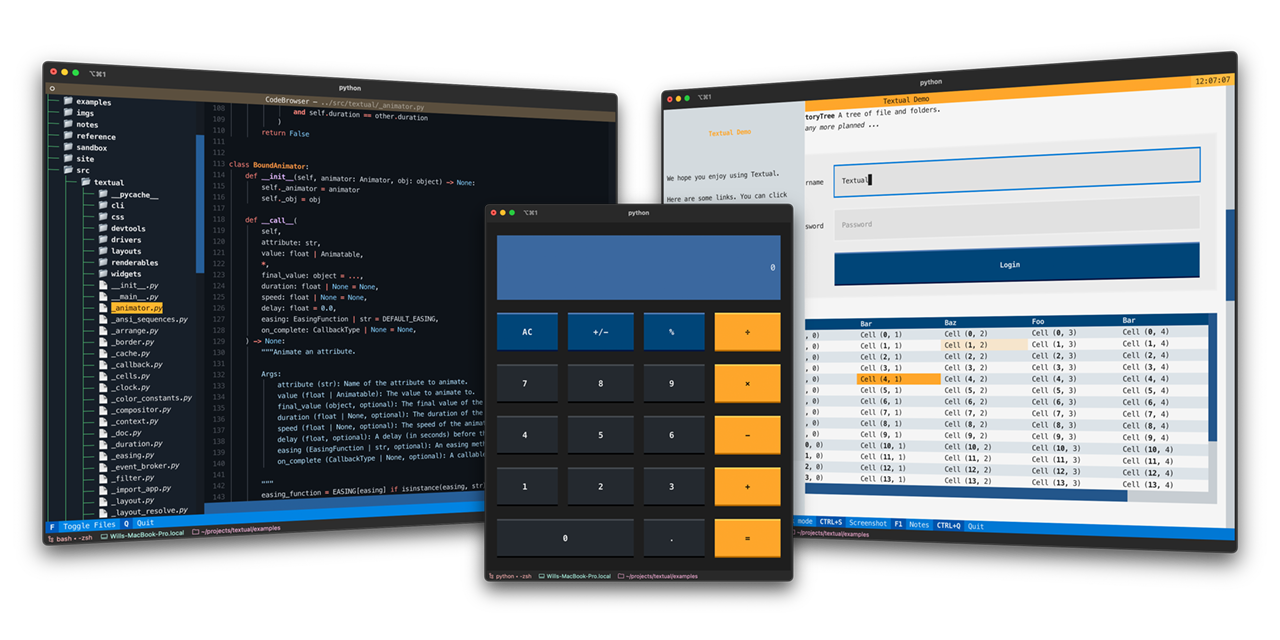
Build cross-platform user interfaces with a simple Python API. Run your apps in the terminal *or* a web browser.
|
||||
Textual is a *Rapid Application Development* framework for Python.
|
||||
|
||||
Textual's API combines modern Python with the best of developments from the web world, for a lean app development experience.
|
||||
De-coupled components and an advanced [testing](https://textual.textualize.io/guide/testing/) framework ensure you can maintain your app for the long-term.
|
||||
Build sophisticated user interfaces with a simple Python API. Run your apps in the terminal and (coming soon) a web browser!
|
||||
|
||||
Want some more examples? See the [examples](https://github.com/Textualize/textual/tree/main/examples) directory.
|
||||
<details>
|
||||
<summary> 🎬 Demonstration </summary>
|
||||
<hr>
|
||||
|
||||
```python
|
||||
"""
|
||||
An App to show the current time.
|
||||
"""
|
||||
|
||||
from datetime import datetime
|
||||
|
||||
from textual.app import App, ComposeResult
|
||||
from textual.widgets import Digits
|
||||
|
||||
|
||||
class ClockApp(App):
|
||||
CSS = """
|
||||
Screen { align: center middle; }
|
||||
Digits { width: auto; }
|
||||
"""
|
||||
|
||||
def compose(self) -> ComposeResult:
|
||||
yield Digits("")
|
||||
|
||||
def on_ready(self) -> None:
|
||||
self.update_clock()
|
||||
self.set_interval(1, self.update_clock)
|
||||
|
||||
def update_clock(self) -> None:
|
||||
clock = datetime.now().time()
|
||||
self.query_one(Digits).update(f"{clock:%T}")
|
||||
|
||||
|
||||
if __name__ == "__main__":
|
||||
app = ClockApp()
|
||||
app.run()
|
||||
```
|
||||
|
||||
> [!TIP]
|
||||
> Textual is an asynchronous framework under the hood. Which means you can integrate your apps with async libraries — if you want to.
|
||||
> If you don't want or need to use async, Textual won't force it on you.
|
||||
A quick run through of some Textual features.
|
||||
|
||||
|
||||
|
||||
<img src="https://img.spacergif.org/spacer.gif" width="1" height="64"/>
|
||||
|
||||
## Widgets
|
||||
|
||||
Textual's library of [widgets](https://textual.textualize.io/widget_gallery/) covers everything from buttons, tree controls, data tables, inputs, text areas, and more…
|
||||
Combined with a flexible [layout](https://textual.textualize.io/how-to/design-a-layout/) system, you can realize any User Interface you need.
|
||||
|
||||
Predefined themes ensure your apps will look good out of the box.
|
||||
https://user-images.githubusercontent.com/554369/197355913-65d3c125-493d-4c05-a590-5311f16c40ff.mov
|
||||
|
||||
|
||||
<table>
|
||||
|
||||
<tr>
|
||||
|
||||
<td>
|
||||
|
||||

|
||||
|
||||
</td>
|
||||
|
||||
<td>
|
||||
|
||||

|
||||
|
||||
</td>
|
||||
|
||||
</tr>
|
||||
</details>
|
||||
|
||||
|
||||
<tr>
|
||||
|
||||
<td>
|
||||
## About
|
||||
|
||||

|
||||
Textual adds interactivity to [Rich](https://github.com/Textualize/rich) with an API inspired by modern web development.
|
||||
|
||||
</td>
|
||||
On modern terminal software (installed by default on most systems), Textual apps can use **16.7 million** colors with mouse support and smooth flicker-free animation. A powerful layout engine and re-usable components makes it possible to build apps that rival the desktop and web experience.
|
||||
|
||||
<td>
|
||||
## Compatibility
|
||||
|
||||

|
||||
|
||||
</td>
|
||||
|
||||
</tr>
|
||||
<tr>
|
||||
|
||||
<td>
|
||||
|
||||

|
||||
|
||||
</td>
|
||||
|
||||
<td>
|
||||
|
||||

|
||||
|
||||
</td>
|
||||
|
||||
|
||||
</tr>
|
||||
|
||||
</table>
|
||||
|
||||
|
||||
<img src="https://img.spacergif.org/spacer.gif" width="1" height="32"/>
|
||||
Textual runs on Linux, macOS, and Windows. Textual requires Python 3.7 or above.
|
||||
|
||||
## Installing
|
||||
|
||||
Install Textual via pip:
|
||||
|
||||
```
|
||||
pip install textual textual-dev
|
||||
pip install "textual[dev]"
|
||||
```
|
||||
|
||||
See [getting started](https://textual.textualize.io/getting_started/) for details.
|
||||
|
||||
|
||||
<img src="https://img.spacergif.org/spacer.gif" width="1" height="32"/>
|
||||
The addition of `[dev]` installs Textual development tools. See the [docs](https://textual.textualize.io/getting_started/) if you need help getting started.
|
||||
|
||||
## Demo
|
||||
|
||||
|
||||
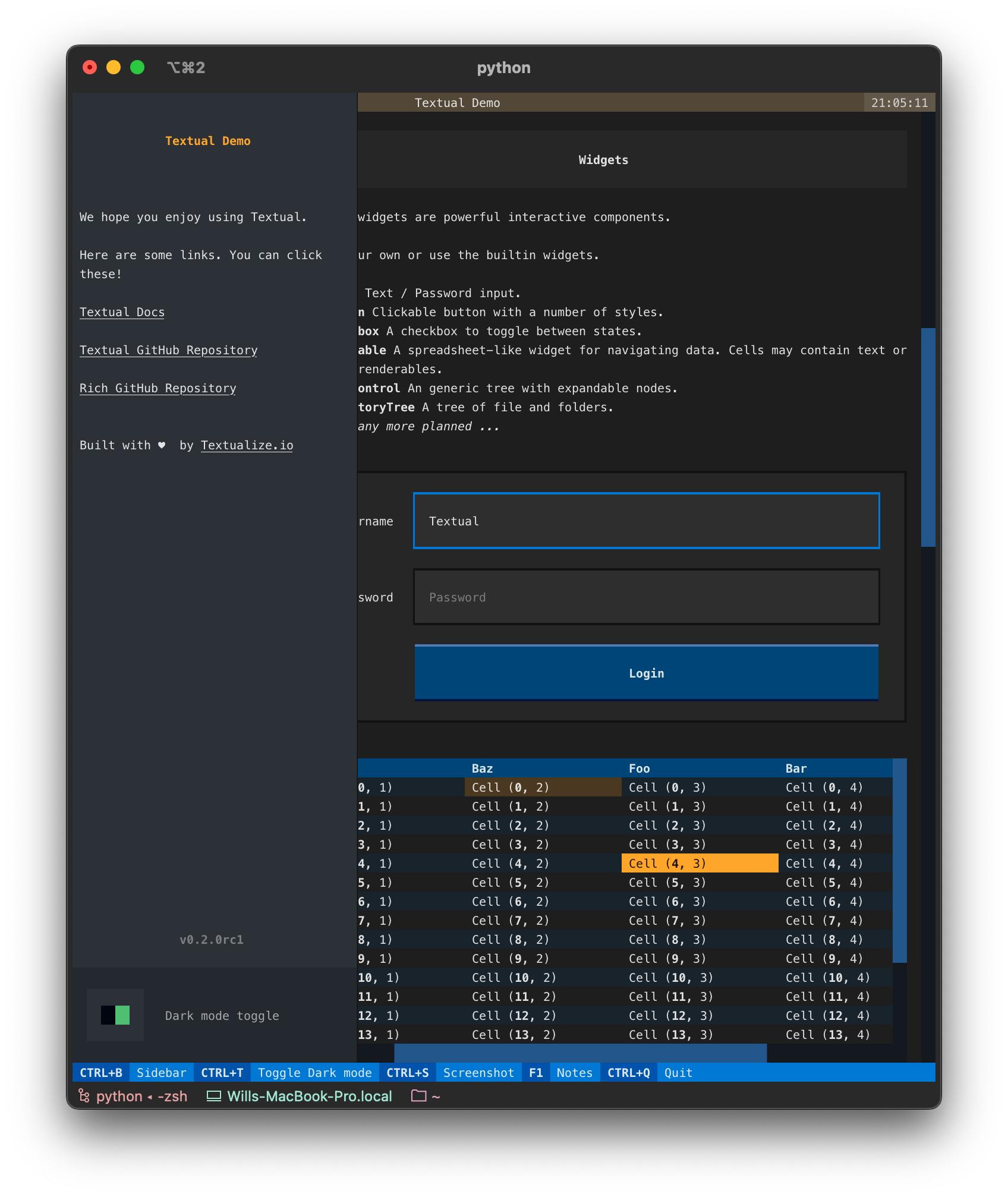
Run the following command to see a little of what Textual can do:
|
||||
|
||||
```
|
||||
python -m textual
|
||||
```
|
||||
|
||||
Or try the [textual demo](https://github.com/textualize/textual-demo) *without* installing (requires [uv](https://docs.astral.sh/uv/)):
|
||||
|
||||
|
||||
## Documentation
|
||||
|
||||
Head over to the [Textual documentation](http://textual.textualize.io/) to start building!
|
||||
|
||||
## Examples
|
||||
|
||||
The Textual repository comes with a number of examples you can experiment with or use as a template for your own projects.
|
||||
|
||||
|
||||
<details>
|
||||
<summary> 🎬 Code browser </summary>
|
||||
<hr>
|
||||
|
||||
This is the [code_browser.py](https://github.com/Textualize/textual/blob/main/examples/code_browser.py) example which clocks in at 61 lines (*including* docstrings and blank lines).
|
||||
|
||||
https://user-images.githubusercontent.com/554369/197188237-88d3f7e4-4e5f-40b5-b996-c47b19ee2f49.mov
|
||||
|
||||
</details>
|
||||
|
||||
|
||||
<details>
|
||||
<summary> 📷 Calculator </summary>
|
||||
<hr>
|
||||
|
||||
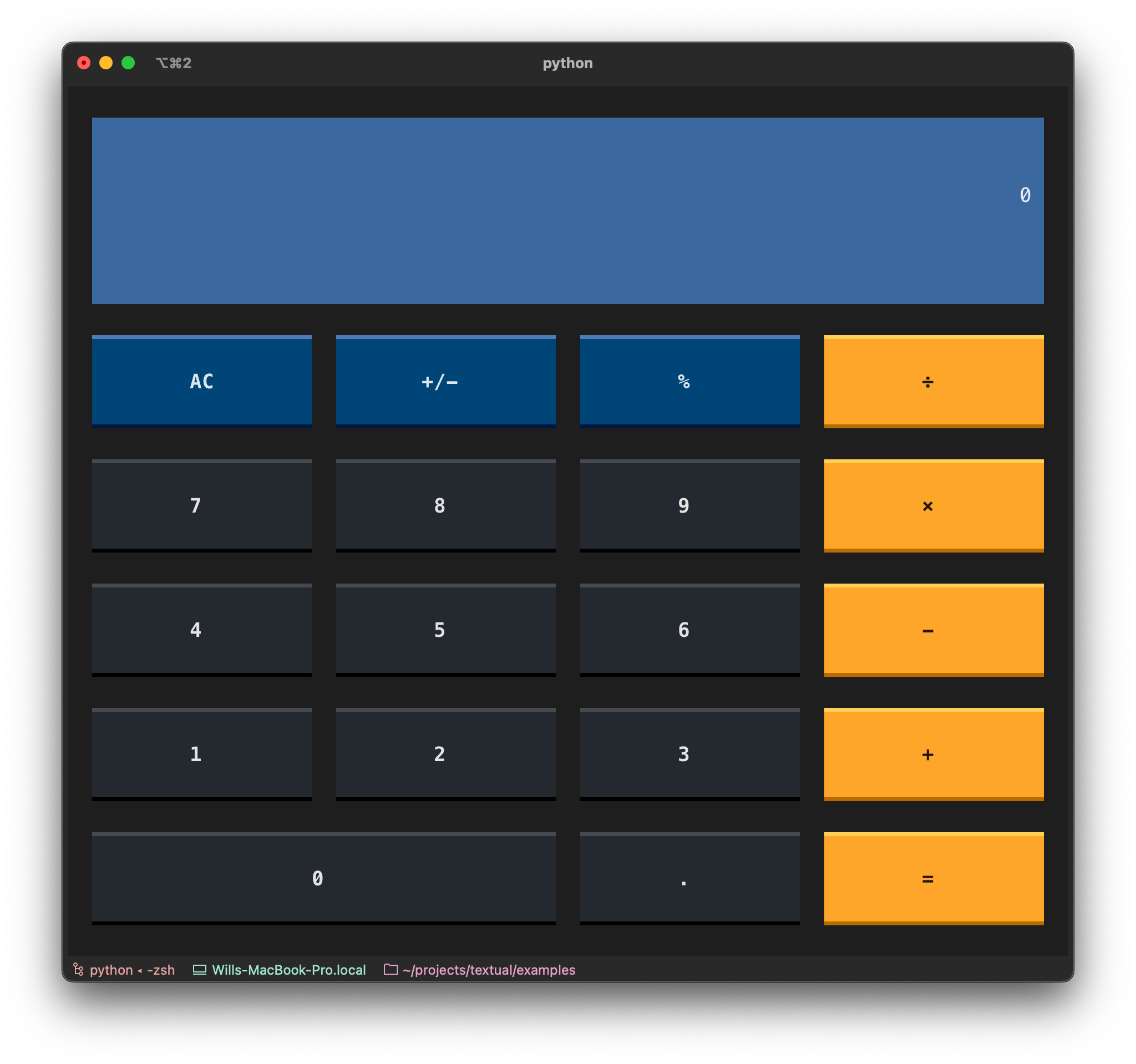
This is [calculator.py](https://github.com/Textualize/textual/blob/main/examples/calculator.py) which demonstrates Textual grid layouts.
|
||||
|
||||
|
||||
</details>
|
||||
|
||||
|
||||
<details>
|
||||
<summary> 🎬 Stopwatch </summary>
|
||||
<hr>
|
||||
|
||||
This is the Stopwatch example from the [tutorial](https://textual.textualize.io/tutorial/).
|
||||
|
||||
|
||||
|
||||
https://user-images.githubusercontent.com/554369/197360718-0c834ef5-6285-4d37-85cf-23eed4aa56c5.mov
|
||||
|
||||
|
||||
|
||||
</details>
|
||||
|
||||
|
||||
|
||||
## Reference commands
|
||||
|
||||
The `textual` command has a few sub-commands to preview Textual styles.
|
||||
|
||||
<details>
|
||||
<summary> 🎬 Easing reference </summary>
|
||||
<hr>
|
||||
|
||||
This is the *easing* reference which demonstrates the easing parameter on animation, with both movement and opacity. You can run it with the following command:
|
||||
|
||||
```bash
|
||||
uvx --python 3.12 textual-demo
|
||||
textual easing
|
||||
```
|
||||
|
||||
<img src="https://img.spacergif.org/spacer.gif" width="1" height="32"/>
|
||||
|
||||
## Dev Console
|
||||
|
||||
<img align="right" width="40%" alt="devtools" src="https://github.com/user-attachments/assets/12c60d65-e342-4b2f-9372-bae0459a7552" />
|
||||
https://user-images.githubusercontent.com/554369/196157100-352852a6-2b09-4dc8-a888-55b53570aff9.mov
|
||||
|
||||
|
||||
How do you debug an app in the terminal that is also running in the terminal?
|
||||
</details>
|
||||
|
||||
The `textual-dev` package supplies a dev console that connects to your application from another terminal.
|
||||
In addition to system messages and events, your logged messages and print statements will appear in the dev console.
|
||||
<details>
|
||||
<summary> 🎬 Borders reference </summary>
|
||||
<hr>
|
||||
|
||||
See [the guide](https://textual.textualize.io/guide/devtools/) for other helpful tools provided by the `textual-dev` package.
|
||||
This is the borders reference which demonstrates some of the borders styles in Textual. You can run it with the following command:
|
||||
|
||||
<img src="https://img.spacergif.org/spacer.gif" width="1" height="32"/>
|
||||
|
||||
## Command Palette
|
||||
|
||||
|
||||
Textual apps have a *fuzzy search* command palette.
|
||||
Hit `ctrl+p` to open the command palette.
|
||||
|
||||
It is easy to extend the command palette with [custom commands](https://textual.textualize.io/guide/command_palette/) for your application.
|
||||
|
||||
|
||||

|
||||
|
||||
<img src="https://img.spacergif.org/spacer.gif" width="1" height="32"/>
|
||||
|
||||
# Textual ❤️ Web
|
||||
|
||||
<img align="right" width="40%" alt="textual-serve" src="https://github.com/user-attachments/assets/a25820fb-87ae-433a-858b-ac3940169242">
|
||||
|
||||
|
||||
Textual apps are equally at home in the browser as they are the terminal. Any Textual app may be served with `textual serve` — so you can share your creations on the web.
|
||||
Here's how to serve the demo app:
|
||||
|
||||
```
|
||||
textual serve "python -m textual"
|
||||
```bash
|
||||
textual borders
|
||||
```
|
||||
|
||||
In addition to serving your apps locally, you can serve apps with [Textual Web](https://github.com/Textualize/textual-web).
|
||||
|
||||
Textual Web's firewall-busting technology can serve an unlimited number of applications.
|
||||
|
||||
Since Textual apps have low system requirements, you can install them anywhere Python also runs. Turning any device into a connected device.
|
||||
No desktop required!
|
||||
https://user-images.githubusercontent.com/554369/196158235-4b45fb78-053d-4fd5-b285-e09b4f1c67a8.mov
|
||||
|
||||
|
||||
<img src="https://img.spacergif.org/spacer.gif" width="1" height="32"/>
|
||||
</details>
|
||||
|
||||
|
||||
## Join us on Discord
|
||||
<details>
|
||||
<summary> 🎬 Colors reference </summary>
|
||||
<hr>
|
||||
|
||||
This is a reference for Textual's color design system.
|
||||
|
||||
```bash
|
||||
textual colors
|
||||
```
|
||||
|
||||
|
||||
|
||||
https://user-images.githubusercontent.com/554369/197357417-2d407aac-8969-44d3-8250-eea45df79d57.mov
|
||||
|
||||
|
||||
|
||||
|
||||
</details>
|
||||
|
||||
Join the Textual developers and community on our [Discord Server](https://discord.gg/Enf6Z3qhVr).
|
||||
|
|
|
|||
315
docs/FAQ.md
|
|
@ -1,315 +0,0 @@
|
|||
---
|
||||
hide:
|
||||
- navigation
|
||||
---
|
||||
|
||||
<!-- Auto-generated by FAQtory -->
|
||||
<!-- Do not edit by hand! -->
|
||||
|
||||
# Frequently Asked Questions
|
||||
|
||||
|
||||
Welcome to the Textual FAQ.
|
||||
Here we try and answer any question that comes up frequently.
|
||||
If you can't find what you are looking for here, see our other [help](./help.md) channels.
|
||||
|
||||
<a name="does-textual-support-images"></a>
|
||||
## Does Textual support images?
|
||||
|
||||
Textual doesn't have built-in support for images yet, but it is on the [Roadmap](https://textual.textualize.io/roadmap/).
|
||||
|
||||
See also the [rich-pixels](https://github.com/darrenburns/rich-pixels) project for a Rich renderable for images that works with Textual.
|
||||
|
||||
---
|
||||
|
||||
<a name="how-can-i-fix-importerror-cannot-import-name-composeresult-from-textualapp-"></a>
|
||||
## How can I fix ImportError cannot import name ComposeResult from textual.app ?
|
||||
|
||||
You likely have an older version of Textual. You can install the latest version by adding the `-U` switch which will force pip to upgrade.
|
||||
|
||||
The following should do it:
|
||||
|
||||
```
|
||||
pip install textual-dev -U
|
||||
```
|
||||
|
||||
---
|
||||
|
||||
<a name="how-can-i-select-and-copy-text-in-a-textual-app"></a>
|
||||
## How can I select and copy text in a Textual app?
|
||||
|
||||
Textual supports text selection for most widgets, via click and drag. Press ctrl+c to copy.
|
||||
|
||||
For widgets that don't yet support text selection, you can try and use your terminal's builtin support.
|
||||
Most terminal emulators offer a modifier key which you can hold while you click and drag to restore the behavior you
|
||||
may expect from the command line. The exact modifier key depends on the terminal and platform you are running on.
|
||||
|
||||
- **iTerm** Hold the OPTION key.
|
||||
- **Gnome Terminal** Hold the SHIFT key.
|
||||
- **Windows Terminal** Hold the SHIFT key.
|
||||
|
||||
Refer to the documentation for your terminal emulator, if it is not listed above.
|
||||
|
||||
---
|
||||
|
||||
<a name="how-can-i-set-a-translucent-app-background"></a>
|
||||
## How can I set a translucent app background?
|
||||
|
||||
Some terminal emulators have a translucent background feature which allows the desktop underneath to be partially visible.
|
||||
|
||||
This feature is unlikely to work with Textual, as the translucency effect requires the use of ANSI background colors, which Textual doesn't use.
|
||||
Textual uses 16.7 million colors where available which enables consistent colors across all platforms and additional effects which aren't possible with ANSI colors.
|
||||
|
||||
For more information on ANSI colors in Textual, see [Why no ANSI Themes?](#why-doesnt-textual-support-ansi-themes).
|
||||
|
||||
---
|
||||
|
||||
<a name="how-do-i-center-a-widget-in-a-screen"></a>
|
||||
## How do I center a widget in a screen?
|
||||
|
||||
!!! tip
|
||||
|
||||
See [*How To Center Things*](https://textual.textualize.io/how-to/center-things/) in the
|
||||
Textual documentation for a more comprehensive answer to this question.
|
||||
|
||||
To center a widget within a container use
|
||||
[`align`](https://textual.textualize.io/styles/align/). But remember that
|
||||
`align` works on the *children* of a container, it isn't something you use
|
||||
on the child you want centered.
|
||||
|
||||
For example, here's an app that shows a `Button` in the middle of a
|
||||
`Screen`:
|
||||
|
||||
```python
|
||||
from textual.app import App, ComposeResult
|
||||
from textual.widgets import Button
|
||||
|
||||
class ButtonApp(App):
|
||||
|
||||
CSS = """
|
||||
Screen {
|
||||
align: center middle;
|
||||
}
|
||||
"""
|
||||
|
||||
def compose(self) -> ComposeResult:
|
||||
yield Button("PUSH ME!")
|
||||
|
||||
if __name__ == "__main__":
|
||||
ButtonApp().run()
|
||||
```
|
||||
|
||||
If you use the above on multiple widgets, you'll find they appear to
|
||||
"left-align" in the center of the screen, like this:
|
||||
|
||||
```
|
||||
+-----+
|
||||
| |
|
||||
+-----+
|
||||
|
||||
+---------+
|
||||
| |
|
||||
+---------+
|
||||
|
||||
+---------------+
|
||||
| |
|
||||
+---------------+
|
||||
```
|
||||
|
||||
If you want them more like this:
|
||||
|
||||
```
|
||||
+-----+
|
||||
| |
|
||||
+-----+
|
||||
|
||||
+---------+
|
||||
| |
|
||||
+---------+
|
||||
|
||||
+---------------+
|
||||
| |
|
||||
+---------------+
|
||||
```
|
||||
|
||||
The best approach is to wrap each widget in a [`Center`
|
||||
container](https://textual.textualize.io/api/containers/#textual.containers.Center)
|
||||
that individually centers it. For example:
|
||||
|
||||
```python
|
||||
from textual.app import App, ComposeResult
|
||||
from textual.containers import Center
|
||||
from textual.widgets import Button
|
||||
|
||||
class ButtonApp(App):
|
||||
|
||||
CSS = """
|
||||
Screen {
|
||||
align: center middle;
|
||||
}
|
||||
"""
|
||||
|
||||
def compose(self) -> ComposeResult:
|
||||
yield Center(Button("PUSH ME!"))
|
||||
yield Center(Button("AND ME!"))
|
||||
yield Center(Button("ALSO PLEASE PUSH ME!"))
|
||||
yield Center(Button("HEY ME ALSO!!"))
|
||||
|
||||
if __name__ == "__main__":
|
||||
ButtonApp().run()
|
||||
```
|
||||
|
||||
---
|
||||
|
||||
<a name="how-do-i-fix-workerdeclarationerror"></a>
|
||||
## How do I fix WorkerDeclarationError?
|
||||
|
||||
Textual version 0.31.0 requires that you set `thread=True` on the `@work` decorator if you want to run a threaded worker.
|
||||
|
||||
If you want a threaded worker, you would declare it in the following way:
|
||||
|
||||
```python
|
||||
@work(thread=True)
|
||||
def run_in_background():
|
||||
...
|
||||
```
|
||||
|
||||
If you *don't* want a threaded worker, you should make your work function `async`:
|
||||
|
||||
```python
|
||||
@work()
|
||||
async def run_in_background():
|
||||
...
|
||||
```
|
||||
|
||||
This change was made because it was too easy to accidentally create a threaded worker, which may produce unexpected results.
|
||||
|
||||
---
|
||||
|
||||
<a name="how-do-i-pass-arguments-to-an-app"></a>
|
||||
## How do I pass arguments to an app?
|
||||
|
||||
When creating your `App` class, override `__init__` as you would when
|
||||
inheriting normally. For example:
|
||||
|
||||
```python
|
||||
from textual.app import App, ComposeResult
|
||||
from textual.widgets import Static
|
||||
|
||||
class Greetings(App[None]):
|
||||
|
||||
def __init__(self, greeting: str="Hello", to_greet: str="World") -> None:
|
||||
self.greeting = greeting
|
||||
self.to_greet = to_greet
|
||||
super().__init__()
|
||||
|
||||
def compose(self) -> ComposeResult:
|
||||
yield Static(f"{self.greeting}, {self.to_greet}")
|
||||
```
|
||||
|
||||
Then the app can be run, passing in various arguments; for example:
|
||||
|
||||
```python
|
||||
# Running with default arguments.
|
||||
Greetings().run()
|
||||
|
||||
# Running with a keyword argument.
|
||||
Greetings(to_greet="davep").run()
|
||||
|
||||
# Running with both positional arguments.
|
||||
Greetings("Well hello", "there").run()
|
||||
```
|
||||
|
||||
---
|
||||
|
||||
<a name="why-do-some-key-combinations-never-make-it-to-my-app"></a>
|
||||
## Why do some key combinations never make it to my app?
|
||||
|
||||
Textual can only ever support key combinations that are passed on by your
|
||||
terminal application. Which keys get passed on can differ from terminal to
|
||||
terminal, and from operating system to operating system.
|
||||
|
||||
Because of this it's best to stick to key combinations that are known to be
|
||||
universally-supported; these include the likes of:
|
||||
|
||||
- Letters
|
||||
- Numbers
|
||||
- Numbered function keys (especially F1 through F10)
|
||||
- Space
|
||||
- Return
|
||||
- Arrow, home, end and page keys
|
||||
- Control
|
||||
- Shift
|
||||
|
||||
When [creating bindings for your
|
||||
application](https://textual.textualize.io/guide/input/#bindings) we
|
||||
recommend picking keys and key combinations from the above.
|
||||
|
||||
Keys that aren't normally passed through by terminals include Cmd and Option
|
||||
on macOS, and the Windows key on Windows.
|
||||
|
||||
If you need to test what [key
|
||||
combinations](https://textual.textualize.io/guide/input/#keyboard-input)
|
||||
work in different environments you can try them out with `textual keys`.
|
||||
|
||||
---
|
||||
|
||||
<a name="why-doesnt-textual-look-good-on-macos"></a>
|
||||
## Why doesn't Textual look good on macOS?
|
||||
|
||||
You may find that the default macOS Terminal.app doesn't render Textual apps (and likely other TUIs) very well, particularly when it comes to box characters.
|
||||
For instance, you may find it displays misaligned blocks and lines like this:
|
||||
|
||||
<img width="1042" alt="Screenshot 2023-06-19 at 10 43 02" src="https://github.com/Textualize/textual/assets/554369/e61f3876-3dd1-4ac8-b380-22922c89c7d6">
|
||||
|
||||
You can (mostly) fix this by opening settings -> profiles > Text tab, and changing the font settings.
|
||||
We have found that Menlo Regular font, with a character spacing of 1 and line spacing of 0.805 produces reasonable results.
|
||||
If you want to use another font, you may have to tweak the line spacing until you get good results.
|
||||
|
||||
<img width="737" alt="Screenshot 2023-06-19 at 10 44 00" src="https://github.com/Textualize/textual/assets/554369/0a052a93-b1fd-4327-9d33-d954b51a9ad2">
|
||||
|
||||
With these changes, Textual apps render more as intended:
|
||||
|
||||
<img width="1042" alt="Screenshot 2023-06-19 at 10 43 23" src="https://github.com/Textualize/textual/assets/554369/a0c4aa05-c509-4ac1-b0b8-e68ce4433f70">
|
||||
|
||||
Even with this *fix*, Terminal.app has a few limitations.
|
||||
It is limited to 256 colors, and can be a little slow compared to more modern alternatives.
|
||||
Fortunately there are a number of free terminal emulators for macOS which produces high quality results.
|
||||
|
||||
We recommend any of the following terminals:
|
||||
|
||||
- [iTerm2](https://iterm2.com/)
|
||||
- [Kitty](https://sw.kovidgoyal.net/kitty/)
|
||||
- [WezTerm](https://wezfurlong.org/wezterm/)
|
||||
|
||||
### Terminal.app colors
|
||||
|
||||
<img width="762" alt="Screenshot 2023-06-19 at 11 00 12" src="https://github.com/Textualize/textual/assets/554369/e0555d23-e141-4069-b318-f3965c880208">
|
||||
|
||||
### iTerm2 colors
|
||||
|
||||
<img width="1002" alt="Screenshot 2023-06-19 at 11 00 25" src="https://github.com/Textualize/textual/assets/554369/9a8cde57-5121-49a7-a2e0-5f6fc871b7a6">
|
||||
|
||||
---
|
||||
|
||||
<a name="why-doesnt-textual-support-ansi-themes"></a>
|
||||
## Why doesn't Textual support ANSI themes?
|
||||
|
||||
Textual will not generate escape sequences for the 16 themeable *ANSI* colors.
|
||||
|
||||
This is an intentional design decision we took for for the following reasons:
|
||||
|
||||
- Not everyone has a carefully chosen ANSI color theme. Color combinations which may look fine on your system, may be unreadable on another machine. There is very little an app author or Textual can do to resolve this. Asking users to simply pick a better theme is not a good solution, since not all users will know how.
|
||||
- ANSI colors can't be manipulated in the way Textual can do with other colors. Textual can blend colors and produce light and dark shades from an original color, which is used to create more readable text and user interfaces. Color blending will also be used to power future accessibility features.
|
||||
|
||||
Textual has a design system which guarantees apps will be readable on all platforms and terminals, and produces better results than ANSI colors.
|
||||
|
||||
There is currently a light and dark version of the design system, but more are planned. It will also be possible for users to customize the source colors on a per-app or per-system basis. This means that in the future you will be able to modify the core colors to blend in with your chosen terminal theme.
|
||||
|
||||
!!! tip "Changed in version 0.80.0"
|
||||
|
||||
Textual added an `ansi_color` boolean to App. If you set this to `True`, then Textual will not attempt to convert ANSI colors. Note that you will lose transparency effects if you enable this setting.
|
||||
|
||||
---
|
||||
|
||||
Generated by [FAQtory](https://github.com/willmcgugan/faqtory)
|
||||
67
docs/_templates/python/material/attribute.html
vendored
Normal file
|
|
@ -0,0 +1,67 @@
|
|||
{{ log.debug("Rendering " + attribute.path) }}
|
||||
|
||||
<div class="doc doc-object doc-attribute">
|
||||
{% with html_id = attribute.path %}
|
||||
|
||||
{% if root %}
|
||||
{% set show_full_path = config.show_root_full_path %}
|
||||
{% set root_members = True %}
|
||||
{% elif root_members %}
|
||||
{% set show_full_path = config.show_root_members_full_path or config.show_object_full_path %}
|
||||
{% set root_members = False %}
|
||||
{% else %}
|
||||
{% set show_full_path = config.show_object_full_path %}
|
||||
{% endif %}
|
||||
|
||||
{% if not root or config.show_root_heading %}
|
||||
|
||||
{% filter heading(heading_level,
|
||||
role="data" if attribute.parent.kind.value == "module" else "attr",
|
||||
id=html_id,
|
||||
class="doc doc-heading",
|
||||
toc_label=attribute.name) %}
|
||||
|
||||
{% if config.separate_signature %}
|
||||
<span class="doc doc-object-name doc-attribute-name">{% if show_full_path %}{{ attribute.path }}{% else %}{{ attribute.name }}{% endif %}</span>
|
||||
{% else %}
|
||||
{% filter highlight(language="python", inline=True) %}
|
||||
{% if show_full_path %}{{ attribute.path }}{% else %}{{ attribute.name }}{% endif %}
|
||||
{% if attribute.annotation %}: {{ attribute.annotation }}{% endif %}
|
||||
{% endfilter %}
|
||||
{% endif %}
|
||||
|
||||
{% with labels = attribute.labels %}
|
||||
{% include "labels.html" with context %}
|
||||
{% endwith %}
|
||||
|
||||
{% endfilter %}
|
||||
|
||||
{% if config.separate_signature %}
|
||||
{% filter highlight(language="python", inline=False) %}
|
||||
{% filter format_code(config.line_length) %}
|
||||
{% if show_full_path %}{{ attribute.path }}{% else %}{{ attribute.name }}{% endif %}
|
||||
{% if attribute.annotation %}: {{ attribute.annotation|safe }}{% endif %}
|
||||
{% endfilter %}
|
||||
{% endfilter %}
|
||||
{% endif %}
|
||||
|
||||
{% else %}
|
||||
{% if config.show_root_toc_entry %}
|
||||
{% filter heading(heading_level,
|
||||
role="data" if attribute.parent.kind.value == "module" else "attr",
|
||||
id=html_id,
|
||||
toc_label=attribute.path if config.show_root_full_path else attribute.name,
|
||||
hidden=True) %}
|
||||
{% endfilter %}
|
||||
{% endif %}
|
||||
{% set heading_level = heading_level - 1 %}
|
||||
{% endif %}
|
||||
|
||||
<div class="doc doc-contents {% if root %}first{% endif %}">
|
||||
{% with docstring_sections = attribute.docstring.parsed %}
|
||||
{% include "docstring.html" with context %}
|
||||
{% endwith %}
|
||||
</div>
|
||||
|
||||
{% endwith %}
|
||||
</div>
|
||||
|
|
@ -1,9 +1 @@
|
|||
---
|
||||
title: "textual.app"
|
||||
---
|
||||
|
||||
::: textual.app
|
||||
options:
|
||||
filters:
|
||||
- "!^_"
|
||||
- "^__init__$"
|
||||
|
|
|
|||
|
|
@ -1,15 +0,0 @@
|
|||
---
|
||||
title: "textual.await_complete"
|
||||
---
|
||||
|
||||
This module contains the `AwaitComplete` class.
|
||||
An `AwaitComplete` object is returned by methods that do work in the *background*.
|
||||
You can await this object if you need to know when that work has completed.
|
||||
Or you can ignore it, and Textual will automatically await the work before handling the next message.
|
||||
|
||||
!!! note
|
||||
|
||||
You are unlikely to need to explicitly create these objects yourself.
|
||||
|
||||
|
||||
::: textual.await_complete
|
||||
|
|
@ -1,15 +1 @@
|
|||
---
|
||||
title: "textual.await_remove"
|
||||
---
|
||||
|
||||
This module contains the `AwaitRemove` class.
|
||||
An `AwaitRemove` object is returned by [`Widget.remove()`][textual.widget.Widget.remove] and other methods which remove widgets.
|
||||
You can await the return value if you need to know exactly when the widget(s) have been removed.
|
||||
Or you can ignore it and Textual will wait for the widgets to be removed before handling the next message.
|
||||
|
||||
!!! note
|
||||
|
||||
You are unlikely to need to explicitly create these objects yourself.
|
||||
|
||||
|
||||
::: textual.await_remove
|
||||
|
|
|
|||
|
|
@ -1,5 +1 @@
|
|||
---
|
||||
title: "textual.binding"
|
||||
---
|
||||
|
||||
::: textual.binding
|
||||
|
|
|
|||
3
docs/api/button.md
Normal file
|
|
@ -0,0 +1,3 @@
|
|||
::: textual.widgets.Button
|
||||
::: textual.widgets._button.ButtonVariant
|
||||
::: textual.widgets._button.InvalidButtonVariant
|
||||
|
|
@ -1,5 +0,0 @@
|
|||
---
|
||||
title: "textual.cache"
|
||||
---
|
||||
|
||||
::: textual.cache
|
||||
1
docs/api/checkbox.md
Normal file
|
|
@ -0,0 +1 @@
|
|||
::: textual.widgets.Checkbox
|
||||
|
|
@ -1,5 +1 @@
|
|||
---
|
||||
title: "textual.color"
|
||||
---
|
||||
|
||||
::: textual.color
|
||||
|
|
|
|||
|
|
@ -1,5 +0,0 @@
|
|||
---
|
||||
title: "textual.command"
|
||||
---
|
||||
|
||||
::: textual.command
|
||||
|
|
@ -1,5 +0,0 @@
|
|||
---
|
||||
title: "textual.constants"
|
||||
---
|
||||
|
||||
::: textual.constants
|
||||
|
|
@ -1,6 +1 @@
|
|||
---
|
||||
title: "textual.containers"
|
||||
---
|
||||
|
||||
|
||||
::: textual.containers
|
||||
|
|
|
|||
|
|
@ -1,5 +0,0 @@
|
|||
---
|
||||
title: "textual.content"
|
||||
---
|
||||
|
||||
::: textual.content
|
||||
1
docs/api/content_switcher.md
Normal file
|
|
@ -0,0 +1 @@
|
|||
::: textual.widgets.ContentSwitcher
|
||||
|
|
@ -1,6 +1 @@
|
|||
---
|
||||
title: "textual.coordinate"
|
||||
---
|
||||
|
||||
|
||||
::: textual.coordinate
|
||||
|
|
|
|||
1
docs/api/data_table.md
Normal file
|
|
@ -0,0 +1 @@
|
|||
::: textual.widgets.DataTable
|
||||
1
docs/api/directory_tree.md
Normal file
|
|
@ -0,0 +1 @@
|
|||
::: textual.widgets.DirectoryTree
|
||||
|
|
@ -1,5 +1 @@
|
|||
---
|
||||
title: "textual.dom"
|
||||
---
|
||||
|
||||
::: textual.dom
|
||||
|
|
|
|||
|
|
@ -1,5 +0,0 @@
|
|||
---
|
||||
title: "textual.errors"
|
||||
---
|
||||
|
||||
::: textual.errors
|
||||
|
|
@ -1,6 +1 @@
|
|||
---
|
||||
title: "textual.events"
|
||||
---
|
||||
|
||||
|
||||
::: textual.events
|
||||
|
|
|
|||
|
|
@ -1,6 +0,0 @@
|
|||
---
|
||||
title: "textual.filter"
|
||||
---
|
||||
|
||||
|
||||
::: textual.filter
|
||||
1
docs/api/footer.md
Normal file
|
|
@ -0,0 +1 @@
|
|||
::: textual.widgets.Footer
|
||||
|
|
@ -1,6 +0,0 @@
|
|||
---
|
||||
title: "textual.fuzzy"
|
||||
---
|
||||
|
||||
|
||||
::: textual.fuzzy
|
||||
|
|
@ -1,6 +1 @@
|
|||
---
|
||||
title: "textual.geometry"
|
||||
---
|
||||
|
||||
|
||||
::: textual.geometry
|
||||
|
|
|
|||
1
docs/api/header.md
Normal file
|
|
@ -0,0 +1 @@
|
|||
::: textual.widgets.Header
|
||||
|
|
@ -1,5 +1,5 @@
|
|||
# API
|
||||
|
||||
This is a API-level reference to the Textual API. Click the links to your left (or in the :octicons-three-bars-16: menu) to open a reference for each module.
|
||||
This is a API-level reference to the Textual API. Click the links to your left (or in the burger menu) to open a reference for each module.
|
||||
|
||||
If you are new to Textual, you may want to read the [tutorial](./../tutorial.md) or [guide](../guide/index.md) first.
|
||||
|
|
|
|||
1
docs/api/input.md
Normal file
|
|
@ -0,0 +1 @@
|
|||
::: textual.widgets.Input
|
||||
1
docs/api/label.md
Normal file
|
|
@ -0,0 +1 @@
|
|||
::: textual.widgets.Label
|
||||
|
|
@ -1,6 +0,0 @@
|
|||
---
|
||||
title: "textual.layout"
|
||||
---
|
||||
|
||||
|
||||
::: textual.layout
|
||||
|
|
@ -1,6 +0,0 @@
|
|||
---
|
||||
title: "textual.lazy"
|
||||
---
|
||||
|
||||
|
||||
::: textual.lazy
|
||||
1
docs/api/list_item.md
Normal file
|
|
@ -0,0 +1 @@
|
|||
::: textual.widgets.ListItem
|
||||
1
docs/api/list_view.md
Normal file
|
|
@ -0,0 +1 @@
|
|||
::: textual.widgets.ListView
|
||||
1
docs/api/loading_indicator.md
Normal file
|
|
@ -0,0 +1 @@
|
|||
::: textual.widgets.LoadingIndicator
|
||||
|
|
@ -1,6 +0,0 @@
|
|||
---
|
||||
title: "textual"
|
||||
---
|
||||
|
||||
|
||||
::: textual
|
||||
|
|
@ -1,4 +0,0 @@
|
|||
---
|
||||
title: "textual.logging"
|
||||
---
|
||||
::: textual.logging
|
||||
|
|
@ -1,8 +0,0 @@
|
|||
---
|
||||
title: "textual.map_geometry"
|
||||
---
|
||||
|
||||
|
||||
A data structure returned by [screen.find_widget][textual.screen.Screen.find_widget].
|
||||
|
||||
::: textual.map_geometry
|
||||
1
docs/api/markdown.md
Normal file
|
|
@ -0,0 +1 @@
|
|||
::: textual.widgets.Markdown
|
||||
1
docs/api/markdown_viewer.md
Normal file
|
|
@ -0,0 +1 @@
|
|||
::: textual.widgets.MarkdownViewer
|
||||
|
|
@ -1,5 +0,0 @@
|
|||
---
|
||||
title: "textual.markup"
|
||||
---
|
||||
|
||||
::: textual.markup
|
||||
|
|
@ -1,5 +1 @@
|
|||
---
|
||||
title: "textual.message"
|
||||
---
|
||||
|
||||
::: textual.message
|
||||
|
|
|
|||
|
|
@ -1,5 +1,5 @@
|
|||
---
|
||||
title: "textual.message_pump"
|
||||
---
|
||||
A message pump is a class that processes messages.
|
||||
|
||||
It is a base class for the `App`, `Screen`, and `Widget` classes.
|
||||
|
||||
::: textual.message_pump
|
||||
|
|
|
|||
|
|
@ -1,7 +0,0 @@
|
|||
---
|
||||
title: "textual.on"
|
||||
---
|
||||
|
||||
# On
|
||||
|
||||
::: textual.on
|
||||
|
|
@ -1,5 +1 @@
|
|||
---
|
||||
title: "textual.pilot"
|
||||
---
|
||||
|
||||
::: textual.pilot
|
||||
|
|
|
|||
2
docs/api/placeholder.md
Normal file
|
|
@ -0,0 +1,2 @@
|
|||
::: textual.widgets.Placeholder
|
||||
::: textual.widgets._placeholder.PlaceholderVariant
|
||||
|
|
@ -1,5 +1 @@
|
|||
---
|
||||
title: "textual.css.query"
|
||||
---
|
||||
|
||||
::: textual.css.query
|
||||
|
|
|
|||
1
docs/api/radiobutton.md
Normal file
|
|
@ -0,0 +1 @@
|
|||
::: textual.widgets.RadioButton
|
||||
1
docs/api/radioset.md
Normal file
|
|
@ -0,0 +1 @@
|
|||
::: textual.widgets.RadioSet
|
||||
|
|
@ -1,5 +1 @@
|
|||
---
|
||||
title: "textual.reactive"
|
||||
---
|
||||
|
||||
::: textual.reactive
|
||||
|
|
|
|||
|
|
@ -1,11 +0,0 @@
|
|||
---
|
||||
title: "textual.renderables"
|
||||
---
|
||||
|
||||
A collection of Rich renderables which may be returned from a widget's [`render()`][textual.widget.Widget.render] method.
|
||||
|
||||
::: textual.renderables.bar
|
||||
::: textual.renderables.blank
|
||||
::: textual.renderables.digits
|
||||
::: textual.renderables.gradient
|
||||
::: textual.renderables.sparkline
|
||||
|
|
@ -1,6 +1 @@
|
|||
---
|
||||
title: "textual.screen"
|
||||
---
|
||||
|
||||
|
||||
::: textual.screen
|
||||
|
|
|
|||
|
|
@ -1,6 +1 @@
|
|||
---
|
||||
title: "textual.scroll_view"
|
||||
---
|
||||
|
||||
|
||||
::: textual.scroll_view
|
||||
|
|
|
|||
|
|
@ -1,5 +0,0 @@
|
|||
---
|
||||
title: "textual.scrollbar"
|
||||
---
|
||||
|
||||
::: textual.scrollbar
|
||||
|
|
@ -1,5 +0,0 @@
|
|||
---
|
||||
title: "textual.signal"
|
||||
---
|
||||
|
||||
::: textual.signal
|
||||
1
docs/api/static.md
Normal file
|
|
@ -0,0 +1 @@
|
|||
::: textual.widgets.Static
|
||||
|
|
@ -1,6 +1 @@
|
|||
---
|
||||
title: "textual.strip"
|
||||
---
|
||||
|
||||
|
||||
::: textual.strip
|
||||
|
|
|
|||
|
|
@ -1,5 +0,0 @@
|
|||
---
|
||||
title: "textual.style"
|
||||
---
|
||||
|
||||
::: textual.style
|
||||
|
|
@ -1,6 +0,0 @@
|
|||
---
|
||||
title: "textual.suggester"
|
||||
---
|
||||
|
||||
|
||||
::: textual.suggester
|
||||
1
docs/api/switch.md
Normal file
|
|
@ -0,0 +1 @@
|
|||
::: textual.widgets.Switch
|
||||
|
|
@ -1,7 +0,0 @@
|
|||
---
|
||||
title: "textual.system_commands"
|
||||
---
|
||||
|
||||
|
||||
|
||||
::: textual.system_commands
|
||||
2
docs/api/tabs.md
Normal file
|
|
@ -0,0 +1,2 @@
|
|||
::: textual.widgets.Tab
|
||||
::: textual.widgets.Tabs
|
||||
1
docs/api/text_log.md
Normal file
|
|
@ -0,0 +1 @@
|
|||
::: textual.widgets.TextLog
|
||||
|
|
@ -1,5 +1 @@
|
|||
---
|
||||
title: "textual.timer"
|
||||
---
|
||||
|
||||
::: textual.timer
|
||||
|
|
|
|||
1
docs/api/toggle_button.md
Normal file
|
|
@ -0,0 +1 @@
|
|||
::: textual.widgets._toggle_button.ToggleButton
|
||||
4
docs/api/tree.md
Normal file
|
|
@ -0,0 +1,4 @@
|
|||
::: textual.widgets.Tree
|
||||
::: textual.widgets._tree.TreeNode
|
||||
::: textual.widgets._tree.NodeID
|
||||
::: textual.widgets._tree.TreeDataType
|
||||
|
|
@ -1,6 +0,0 @@
|
|||
---
|
||||
title: "textual.types"
|
||||
---
|
||||
|
||||
|
||||
::: textual.types
|
||||
|
|
@ -1,6 +0,0 @@
|
|||
---
|
||||
title: "textual.validation"
|
||||
---
|
||||
|
||||
|
||||
::: textual.validation
|
||||
|
|
@ -1,6 +1 @@
|
|||
---
|
||||
title: "textual.walk"
|
||||
---
|
||||
|
||||
|
||||
::: textual.walk
|
||||
|
|
|
|||
1
docs/api/welcome.md
Normal file
|
|
@ -0,0 +1 @@
|
|||
::: textual.widgets.Welcome
|
||||
|
|
@ -1,10 +1 @@
|
|||
---
|
||||
title: "textual.widget"
|
||||
---
|
||||
|
||||
|
||||
::: textual.widget
|
||||
options:
|
||||
filters:
|
||||
- "!^_"
|
||||
- "^__init__$"
|
||||
|
|
|
|||
|
|
@ -1,6 +0,0 @@
|
|||
---
|
||||
title: "textual.work"
|
||||
---
|
||||
|
||||
|
||||
::: textual.work
|
||||
|
|
@ -1,5 +0,0 @@
|
|||
---
|
||||
title: "textual.worker"
|
||||
---
|
||||
|
||||
::: textual.worker
|
||||
|
|
@ -1,5 +0,0 @@
|
|||
---
|
||||
title: "textual.worker_manager"
|
||||
---
|
||||
|
||||
::: textual.worker_manager
|
||||
|
|
@ -1,17 +1,16 @@
|
|||
authors:
|
||||
willmcgugan:
|
||||
willmcgugan:
|
||||
name: Will McGugan
|
||||
description: CEO / code-monkey
|
||||
avatar: https://github.com/willmcgugan.png
|
||||
darrenburns:
|
||||
darrenburns:
|
||||
name: Darren Burns
|
||||
description: Code-monkey
|
||||
avatar: https://github.com/darrenburns.png
|
||||
davep:
|
||||
davep:
|
||||
name: Dave Pearson
|
||||
description: Code-monkey
|
||||
avatar: https://github.com/davep.png
|
||||
rodrigo:
|
||||
rodrigo:
|
||||
name: Rodrigo Girão Serrão
|
||||
description: Code-monkey
|
||||
avatar: https://github.com/rodrigogiraoserrao.png
|
||||
|
|
|
|||

|
Before Width: | Height: | Size: 40 KiB |

|
Before Width: | Height: | Size: 99 KiB |

|
Before Width: | Height: | Size: 89 KiB |

|
|
@ -1,21 +0,0 @@
|
|||
<svg version="1.1" xmlns="http://www.w3.org/2000/svg" viewBox="0 0 623.0110473632812 172.49923719399783" width="623.0110473632812" height="172.49923719399783">
|
||||
<!-- svg-source:excalidraw -->
|
||||
<!-- payload-type:application/vnd.excalidraw+json --><!-- payload-version:2 --><!-- payload-start -->eyJ2ZXJzaW9uIjoiMSIsImVuY29kaW5nIjoiYnN0cmluZyIsImNvbXByZXNzZWQiOnRydWUsImVuY29kZWQiOiJ4nM2U22rbQFx1MDAxMIbv/Vx1MDAxNEa9bZQ9XHUwMDFmXHUwMDAypZA0hLTBXHI4pTilXHUwMDE0WVpZQrKkSms7aci7d6Q4XsWtQ1posS5cdTAwMTZ2Znfmn9lPczdcdTAwMThcdTAwMGU9e1tcdTAwMTnvaOiZmzDI06hcdTAwMGVW3uvWvjR1k5ZcdTAwMDW4SLdvykVcdTAwMWR2J1x1MDAxM2ur5ujwcFx1MDAxZdSZsVVcdTAwMWWExl+mzVwiyFx1MDAxYruI0tJcdTAwMGbL+WFqzbx5266jYG7eVOU8srXvklx1MDAxY5gotWX9kMvkZm5cbttA9C+wXHUwMDFmXHUwMDBl77q1p642oVxyilluulx1MDAwYp3LXHTUets4KotOq4KPY6Tp5kDavINs1kTgjUGxcZ7W5H2Y1MnFdzxNwtPl9XjUyNE0XHUwMDFiuaRxmudje5t3oppcdTAwMTJqcb7G1mVmPqeRTVx1MDAxZbvWs++6VZeLWVKYpi1cdTAwMWVvrGVcdTAwMTWEqb1tbVxibaxcdTAwMGZcdTAwMWQ4XHUwMDFhOstccuxcdTAwMGVcdTAwMDT1OeKcUKGwYEhcdTAwMTC+8bdcdTAwMTEolz5WmnGmpaBcdTAwMTRJviXtpMzhJUDaK6wlXHUwMDBliVx1MDAxMzdccsJsXHUwMDA2XG6LyJ1cdHik4tidWa1cdTAwMGJcdTAwMTaI+lxiY8QkXHUwMDE1lCjsXHUwMDFhkJh0lti2J8pXjDGCqVx1MDAxMlx1MDAxMqu+XHUwMDEw072IpFxuMyWE3Dja7NV51KHx1T1DXHJQnbc3ikWe93tZROtePlwi5CCia8u9K689f9qDz2VYVFHwQFx0lpQyLFxiVko6jvK0yLbT52WYObBcdTAwMDa9XFx/xjMnZFx1MDAxN9BcdTAwMWEhXHQ4I/xioC+zM/w+mVxcXHUwMDEwXHUwMDFkf7sqP02v8/LjeN+BJj5RQkO/XHUwMDExXHUwMDEzfUza+0Qz4ExcdTAwMTNcIjXhwPRumkmsXHJjz9M8JTGZTn+lmXLkKy4lZtBvIVXvn3I4XHUwMDBin1x0LFx1MDAxMFxmmVx1MDAwZWe2jTOmXHUwMDE4PEyjveSZw9/2X3iGXHUwMDE3l7uAplx1MDAxMlx0xEHNy4E+WY1XJrnKJseJvsTV5KxcdTAwMTlcdTAwMWTsN9BcdTAwMThrXHUwMDFmXHUwMDAxXGJcbmhVhCqknlx1MDAxMk1hgFMmqMZCI457429cdTAwMWJpgyhA9TzScVx1MDAxY+pQ/yOkXHUwMDA1jG8msaD7SDTBfzGhYe2CekFVjS2E3EiD0tJonP4wT8J4y9Ssjn/b9/bzXHUwMDA2a/0tiaar835w/1x1MDAxM/xcdTAwMThbnyJ9<!-- payload-end -->
|
||||
<defs>
|
||||
<style class="style-fonts">
|
||||
@font-face {
|
||||
font-family: "Virgil";
|
||||
src: url("https://file%2B.vscode-resource.vscode-cdn.net/Users/willmcgugan/.vscode/extensions/pomdtr.excalidraw-editor-3.7.4/public//dist/excalidraw-assets/Virgil.woff2");
|
||||
}
|
||||
@font-face {
|
||||
font-family: "Cascadia";
|
||||
src: url("https://file%2B.vscode-resource.vscode-cdn.net/Users/willmcgugan/.vscode/extensions/pomdtr.excalidraw-editor-3.7.4/public//dist/excalidraw-assets/Cascadia.woff2");
|
||||
}
|
||||
@font-face {
|
||||
font-family: "Assistant";
|
||||
src: url("https://file%2B.vscode-resource.vscode-cdn.net/Users/willmcgugan/.vscode/extensions/pomdtr.excalidraw-editor-3.7.4/public//dist/excalidraw-assets/Assistant-Regular.woff2");
|
||||
}
|
||||
</style>
|
||||
|
||||
</defs>
|
||||
<rect x="0" y="0" width="623.0110473632812" height="172.49923719399783" fill="#ffffff"></rect><g stroke-linecap="round" transform="translate(10 133.65481580727908) rotate(0 301.5055236816406 14.422210693359375)"><path d="M7.21 0 C153.8 1.19, 300.24 1.5, 595.8 0 C599.7 3.6, 604.82 -0.83, 603.01 7.21 C603.55 10.8, 600.38 13.49, 603.01 21.63 C601.83 25.14, 598.51 26.61, 595.8 28.84 C462.34 25.32, 327.98 25.56, 7.21 28.84 C3.48 26.79, -2.06 23.32, 0 21.63 C-1.23 16.03, 1.94 10.15, 0 7.21 C1.99 2.32, 4.84 1.65, 7.21 0" stroke="none" stroke-width="0" fill="#a5d8ff"></path><path d="M7.21 0 C131.49 1.68, 256.9 1.46, 595.8 0 M7.21 0 C187.79 2.19, 367.96 2.56, 595.8 0 M595.8 0 C598.99 0.97, 604.55 2.5, 603.01 7.21 M595.8 0 C598.7 -1.96, 603.13 1.07, 603.01 7.21 M603.01 7.21 C603.95 12.35, 601.66 13.96, 603.01 21.63 M603.01 7.21 C603.48 12.17, 603.53 18.82, 603.01 21.63 M603.01 21.63 C604.26 28.11, 600.97 29.34, 595.8 28.84 M603.01 21.63 C602.96 28.33, 599.84 29.21, 595.8 28.84 M595.8 28.84 C458.45 28.69, 319.07 28.35, 7.21 28.84 M595.8 28.84 C447.81 26.6, 300.16 27.23, 7.21 28.84 M7.21 28.84 C3.28 29.1, -0.43 27.58, 0 21.63 M7.21 28.84 C2.01 29.02, 1.9 24.45, 0 21.63 M0 21.63 C1.1 16, 0.95 10.94, 0 7.21 M0 21.63 C0.85 16.58, 0.69 12.1, 0 7.21 M0 7.21 C-0.1 3.34, 2.5 -1.83, 7.21 0 M0 7.21 C-0.31 2.23, 2.09 0.6, 7.21 0" stroke="#1971c2" stroke-width="2" fill="none"></path></g><g stroke-linecap="round" transform="translate(11.218536376953125 70.48458875649783) rotate(0 175.42885735483912 13.230804443359375)"><path d="M6.62 0 C91.52 1.52, 175.9 4.86, 344.24 0 C350.46 -3.23, 349.59 0.49, 350.86 6.62 C348.62 10.65, 350.14 16.33, 350.86 19.85 C348.76 22.02, 346.06 25.93, 344.24 26.46 C264.64 22.58, 183.37 22.39, 6.62 26.46 C0.15 23.34, 1.07 22.34, 0 19.85 C1.78 14.81, 1.44 13.33, 0 6.62 C2.43 3.85, 3.06 0.6, 6.62 0" stroke="none" stroke-width="0" fill="#b2f2bb"></path><path d="M6.62 0 C81.03 -0.09, 153.93 1.16, 344.24 0 M6.62 0 C76.19 0.52, 146.43 0.18, 344.24 0 M344.24 0 C350.19 0.09, 349.2 0.5, 350.86 6.62 M344.24 0 C348.77 -1.34, 350.19 1.73, 350.86 6.62 M350.86 6.62 C349.73 10.18, 352.02 15.66, 350.86 19.85 M350.86 6.62 C351.43 10.61, 351.36 14.04, 350.86 19.85 M350.86 19.85 C351.22 24.75, 348.6 28.1, 344.24 26.46 M350.86 19.85 C350.09 24.63, 347.15 26.23, 344.24 26.46 M344.24 26.46 C246.39 26.62, 150.1 26.7, 6.62 26.46 M344.24 26.46 C271.17 25.35, 197.87 24.87, 6.62 26.46 M6.62 26.46 C1.78 27.6, -0.34 24.41, 0 19.85 M6.62 26.46 C4.1 24.47, 0.57 24.22, 0 19.85 M0 19.85 C0.77 14.51, 0 10.39, 0 6.62 M0 19.85 C0.38 15.53, -0.16 12.72, 0 6.62 M0 6.62 C0.09 0.38, 1.94 -0.15, 6.62 0 M0 6.62 C-0.31 2.81, 1.03 -0.35, 6.62 0" stroke="#2f9e44" stroke-width="2" fill="none"></path></g><g stroke-linecap="round" transform="translate(192.5730086398787 10) rotate(0 175.42885735483912 13.230804443359375)"><path d="M6.62 0 C87.01 3.99, 169.82 -0.59, 344.24 0 C347.38 -1.72, 354.44 3.13, 350.86 6.62 C349.85 9.61, 349.24 12.84, 350.86 19.85 C348.27 23.73, 346.47 28.48, 344.24 26.46 C265.99 23.08, 184.92 22.36, 6.62 26.46 C3.27 24.55, -2.01 22.35, 0 19.85 C1.15 16.25, 1.44 13.86, 0 6.62 C0.86 2.81, 3.33 2.32, 6.62 0" stroke="none" stroke-width="0" fill="#ffc9c9"></path><path d="M6.62 0 C97.63 1.79, 187.23 1.42, 344.24 0 M6.62 0 C109.53 -1.9, 214.03 -2.2, 344.24 0 M344.24 0 C346.99 -1.7, 350.96 1.04, 350.86 6.62 M344.24 0 C347.99 -0.47, 351.86 3.76, 350.86 6.62 M350.86 6.62 C351.81 11.66, 350.2 17.68, 350.86 19.85 M350.86 6.62 C351.37 10.15, 351.07 12.74, 350.86 19.85 M350.86 19.85 C350.81 25.9, 347.99 26.78, 344.24 26.46 M350.86 19.85 C349.35 24.02, 348.34 28.42, 344.24 26.46 M344.24 26.46 C235.52 25.75, 126.99 25.63, 6.62 26.46 M344.24 26.46 C268.25 28.47, 191.53 28.76, 6.62 26.46 M6.62 26.46 C1.86 26.61, 1.65 22.53, 0 19.85 M6.62 26.46 C2.77 26.43, 0.26 26, 0 19.85 M0 19.85 C0.02 15.53, -0.34 14.98, 0 6.62 M0 19.85 C-0.13 17.3, -0.07 13.54, 0 6.62 M0 6.62 C-0.27 2.05, 1.94 0.53, 6.62 0 M0 6.62 C-1.17 1.85, 1.09 0.09, 6.62 0" stroke="#e03131" stroke-width="2" fill="none"></path></g></svg>
|
||||
|
Before Width: | Height: | Size: 6.5 KiB |

|
Before Width: | Height: | Size: 17 KiB |

|
Before Width: | Height: | Size: 15 KiB |

|
Before Width: | Height: | Size: 38 KiB |

|
Before Width: | Height: | Size: 8 KiB |

|
Before Width: | Height: | Size: 19 KiB |

|
Before Width: | Height: | Size: 53 KiB |