| assets | ||
| Adafruit 3.2in TFT 320x240.brd | ||
| Adafruit 3.2in TFT 320x240.sch | ||
| license.txt | ||
| README.md | ||

Adafruit 3.2" TFT LCD with Touchscreen Breakout Board w/MicroSD Socket - ILI9341 PCB
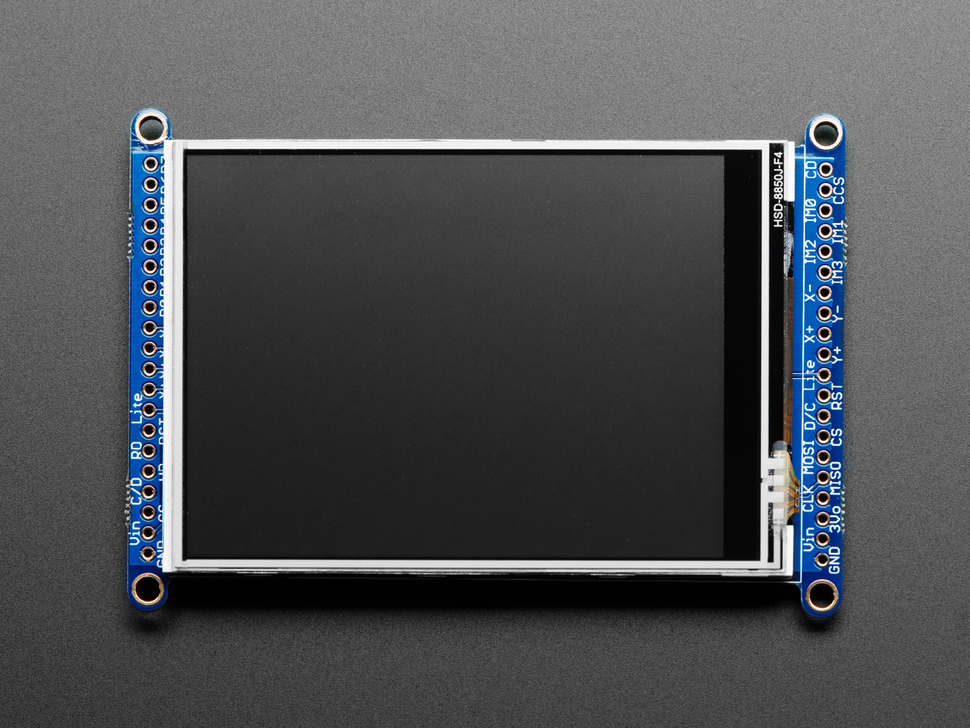
Click here to purchase one from the Adafruit shop
PCB files for the Adafruit 3.2" TFT LCD with Touchscreen Breakout Board w/MicroSD Socket - ILI9341.
Format is EagleCAD schematic and board layout
Description
Add some jazz & pizazz to your project with a color touchscreen LCD. This TFT display is really big (3.2" diagonal) bright (6 white-LED backlight) and colorful! 240x320 pixels with individual RGB pixel control, this has way more resolution than a black and white 128x64 display. As a bonus, this display has a resistive touchscreen attached to it already, so you can detect finger presses anywhere on the screen.
This display has a controller built into it with RAM buffering, so that almost no work is done by the microcontroller. The display can be used in two modes: 8-bit and SPI. For 8-bit mode, you'll need 8 digital data lines and 4 or 5 digital control lines to read and write to the display (12 lines total). SPI mode requires only 5 pins total (SPI data in, data out, clock, select, and d/c) but is slower than 8-bit mode. In addition, 4 pins are required for the touch screen (2 digital, 2 analog) or you can purchase and use our resistive touchscreen controller (not included) to use I2C or SPI
We wrapped up this display into an easy-to-use breakout board, with SPI connections on one end and 8-bit on the other. Both are 3-5V compliant with high-speed level shifters so you can use with any microcontroller. If you're going with SPI mode, you can also take advantage of the onboard MicroSD card socket to display images. (microSD card not included, but any will work)
Of course, we wouldn't just leave you with a datasheet and a "good luck!". For 8-bit interface fans we've written a full open source graphics library that can draw pixels, lines, rectangles, circles, text, and more. For SPI users, we have a library as well, its separate from the 8-bit library since both versions are heavily optimized. We also have a touch screen library that detects x, y and z (pressure) and example code to demonstrate all of it.
Follow our step by step guide for wiring, code and drawing. You'll be running in 15 minutes
License
Adafruit invests time and resources providing this open source design, please support Adafruit and open-source hardware by purchasing products from Adafruit!
Designed by Limor Fried/Ladyada for Adafruit Industries.
Creative Commons Attribution/Share-Alike, all text above must be included in any redistribution. See license.txt for additional details.