
250 lines
9.8 KiB
Markdown
250 lines
9.8 KiB
Markdown
# RP2040 Doom
|
|
|
|
This is a port of Doom for RP2040 devices, derived from [Chocolate Doom](https://github.com/chocolate-doom/chocolate-doom).
|
|
|
|
Significant changes have been made to support running on the RP2040 device, but particularly to support running the
|
|
entire shareware `DOOM1.WAD` which is 4M big on a Raspberry Pi Pico with only 2M flash!
|
|
|
|
You can read many details on this port in the blog post [here](https://kilograham.github.io/rp2040-doom/).
|
|
|
|
Note that a hopefully-fully-functional `chocolate-doom` executable is buildable from this RP2040 code base as a
|
|
means of
|
|
verification that everything still works, but whilst they can still be built, Hexen, Strife and Heretic are almost
|
|
certainly broken, so are not built by default.
|
|
|
|
This chocolate-doom commit that the code is branched off can be found in the `upstream` branch.
|
|
|
|
The original Chocolate Doom README is [here](README-chocolate.md).
|
|
|
|
## Code State
|
|
|
|
Thus far, the focus has been entirely on getting RP2040 Doom running. Not a lot of time has been
|
|
spent
|
|
cleaning
|
|
the code up. There are a bunch of defunct `#ifdefs` and other code that was useful at some point,
|
|
but no longer are, and indeed changing them may result in non-functional code. This is particularly
|
|
true of
|
|
the
|
|
`whd_gen` tool
|
|
used to
|
|
convert/compress WADs
|
|
who's code is
|
|
likely completely incomprehensible!
|
|
|
|
## Artifacts
|
|
|
|
You can find a RP2040 Doom UF2s based on the standard VGA/I2S pins in the
|
|
releases of this repository. There are also versions with the shareware DOOM1.WAD already embedded.
|
|
|
|
Note you can always use `picotool info -a <UF2 file>` to see the pins used by a particular build.
|
|
|
|
## Goals
|
|
|
|
The main goals for this port were:
|
|
|
|
1. Everything should match the original game experience, i.e. all the graphics at classic 320x200 resolution, stereo
|
|
sound,
|
|
OPL2 music, save/load, demo playback, cheats, network multiplayer... basically it should feel like the original game.
|
|
2. `DOOM1.WAD` should run on a Raspberry Pi Pico. There was also to be no sneaky discarding of splash screens, altering of levels, down-sampling of
|
|
textures or whatever. RP2040 boards with 8M should be able to play at least the full *Ultimate Doom* and *DOOM II*
|
|
WADs.
|
|
3. The RP2040 should output directly to VGA (16 color pins for RGB565 along with HSync/VSync) along with stereo sound.
|
|
|
|
## Results
|
|
|
|
[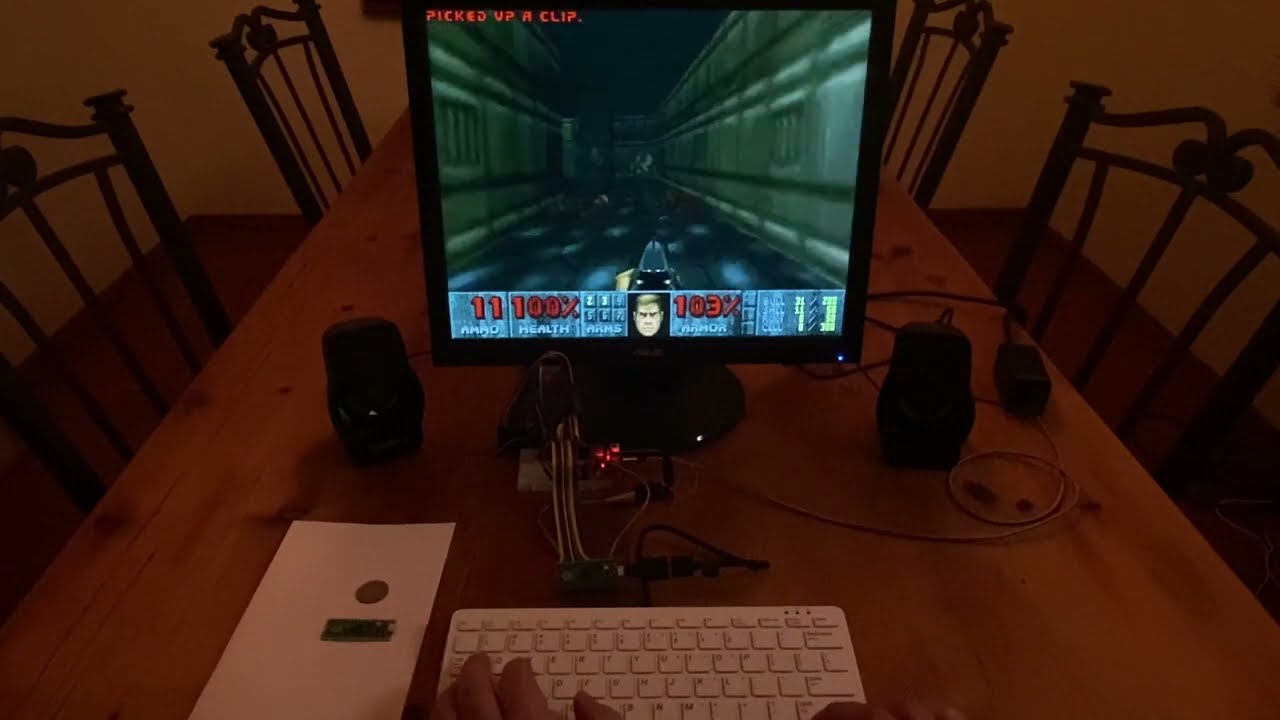](https://youtu.be/eDVazQVycP4)
|
|
|
|
Features:
|
|
|
|
* Full `DOOM1.WAD` playable on Raspberry Pi Pico with 2M flash.
|
|
* *Ultimate Doom* and *Doom II* are playable on 8M devices.
|
|
* 320x200x60 VGA output (really 1280x1024x60).
|
|
* 9 Channel OPL2 Sound at 49716Hz.
|
|
* 9 Channel Stereo Sound Effects.
|
|
* I2C networking for up to 4 players.
|
|
* Save/Load of games.
|
|
* All cheats supported.
|
|
* Demos from original WADs run correctly.
|
|
* USB Keyboard Input support.
|
|
* All end scenes, intermissions, help screens etc. supported.
|
|
* Good frame rate; generally 30-35+ FPS.
|
|
* Uses 270Mhz overclock (requires flash chip that will run at 135Mhz)
|
|
|
|
# Building
|
|
|
|
RP2040 Doom should build fine on Linux and macOS. The RP2040 targeting builds should also work on Windows, though I
|
|
haven't tried.
|
|
|
|
The build uses `CMake`.
|
|
|
|
## Regular chocolate-doom/native builds
|
|
|
|
To build everything, assuming you have SDL2 dependencies installed, you can create a build directory:
|
|
|
|
```bash
|
|
mkdir build
|
|
cd build
|
|
cmake ..
|
|
```
|
|
|
|
And then run `make` or `make -j<num_cpus>` from that directory. To build a particular target e.g. `chocolate-doom`,
|
|
do `make chocolate-doom`
|
|
|
|
Note this is the way you build the `whd_gen` tool too.
|
|
|
|
## RP2040 Doom builds
|
|
|
|
You must have [pico-sdk](https://github.com/raspberrypi/pico-sdk) and
|
|
**the latest version of** [pico-extras](https://github.com/raspberrypi/pico-extras) installed, along with the regular
|
|
pico-sdk requisites (e.g.
|
|
`arm-none-eabi-gcc`). If in doubt, see the Raspberry Pi
|
|
[documentation](https://datasheets.raspberrypi.com/pico/getting-started-with-pico.pdf). I have been building against
|
|
the `develop` branch of `pico-sdk`, so I recommend that..
|
|
|
|
**NOTE: I was building with arm-none-eabi-gcc 9.2.1 .. it seems like other versions may cause problems with binary
|
|
size, so stick with that for now.**
|
|
|
|
For USB keyboard input support, RP2040 Doom currently uses a modified version of TinyUSB included as a submodule.
|
|
Make sure you have initialized this submodule via `git submodule update --init`
|
|
|
|
You can create a build directly like this:
|
|
|
|
```bash
|
|
mkdir rp2040-build
|
|
cd rp2040-build
|
|
cmake -DCMAKE_BUILD_TYPE=MinSizeRel -DPICO_BOARD=vgaboard -DPICO_SDK_PATH=/path/to/pico-sdk -DPICO_EXTRAS_PATH=/path/to/pico-extras ..
|
|
```
|
|
|
|
Note that the `PICO_BOARD` setting is for the standard VGA demo board which has RGB on pins 0->15, sync pins on 16,17
|
|
and
|
|
I2S on 26,27,28.
|
|
|
|
As before, use `make` or `make <target>` to build.
|
|
|
|
The RP2040 version has four targets, each of which create a similarly named `UF2` file (e.g. `doom_tiny.uf2`).
|
|
These UF2 files contain the executable code/data, but they do not contain the WAD data which is converted into a
|
|
RP2040 Domom
|
|
specific WHD/WHX format by `whd_gen` (for more see below). The WHD/WHX file must also be loaded onto the device at a
|
|
specific address which varies by binary.
|
|
|
|
"super-tiny" refers to RP2040 Doom builds that use the more compressed WHX format, and
|
|
required for`DOOM1.
|
|
WAD` to
|
|
run
|
|
on a 2M Raspberry Pi Pico. "Non super-tiny" refers to RP2040 Doom builds that use the WHD format which is larger, but
|
|
also is
|
|
required for *Ultimate Doom* and *Doom II* WADs. These binaries are distinct as supporting both formats in the same
|
|
binary would just have made things bigger and slower.
|
|
|
|
|
|
* **doom_tiny** This is a "super tiny" version with no USB keyboard support. You can use
|
|
[SDL Event Forwarder](https://github.com/kilograham/sdl_event_forwarder) to tunnel keyboard input from your host
|
|
computer over UART. The WHX file must be loaded at `0x10040000`.
|
|
* **doom_tiny_usb** This is a "super tiny" version with additional USB keyboard support. Because of the extra USB
|
|
code, the WHX file must be loaded at `0x10042000`. As you can see USB support via TinyUSB causes the binary to
|
|
grow by 2K (hence the move of the WHX file address) leaving less space for saved games (which are also stored in
|
|
flash).
|
|
* **doom_tiny_nost** This is a "non super tiny" version of `doom_tiny` supporting larger WADs stored as WHD. The WHD
|
|
file must be loaded at `0x10048000`
|
|
* **doom_tiny_nost_usb** This is a "non super tiny" version of `doom_tiny_usb` supporting larger WADs stored as
|
|
WHD. The WHD
|
|
file must be loaded at `0x10048000`
|
|
|
|
You can load you WHD/WHX file using [picotool](https://github.com/raspberrypi/picotool). e.g.
|
|
|
|
```bash
|
|
picotool load -v -t bin doom1.whx -o 0x10042000.
|
|
```
|
|
|
|
See `whd_gen` further below for generating `WHX` or `WHD` files.
|
|
|
|
#### USB keyboard support
|
|
|
|
Note that TinyUSB host mode support for keyboard may not work with all keyboards especially since the RP2040 Doom
|
|
has been built with small limits for number/sizes of hubs etc. I know that Raspberry Pi keyboards work fine, as
|
|
did my ancient
|
|
Dell keyboard. Your keyboard may just do nothing, or may cause a crash. If so, for now, you are stuck forwarding
|
|
keys from another PC via sdl_event_forwarder.
|
|
|
|
### RP2040 Doom builds not targeting an RP2040 device
|
|
|
|
You can also build the RP2040 Doom to run on your host computer (Linux or macOS) by using
|
|
[pico_host_sdl](https://github.com/raspberrypi/pico-host-sdl) which simulates RP2040 based video/audio output using SDL.
|
|
|
|
This version currently embeds the WHD/WHX in `src/tiny.whd.h` so you must generate this file.
|
|
|
|
You can do this via `./cup.sh <whd/whx_file>`
|
|
|
|
```bash
|
|
mkdir host-build
|
|
cd host-build
|
|
cmake -DPICO_PLATFORM=host -DPICO_SDK_PATH=/path/to/pico-sdk -DPICO_EXTRAS_PATH=/path/to/pico-extras -DPICO_SDK_PRE_LIST_DIRS=/path/to/pico_host_sdl ..
|
|
```
|
|
|
|
... and then `make` as usual.
|
|
|
|
## whd_gen
|
|
|
|
`doom1.whx` is includd in this repository, otherwise you need to build `whd_gen` using the regular native build
|
|
instructions above.
|
|
|
|
To generate a WHX file (you must use this to convert DOOM1.WAD to run on a 2M Raspberry Pi Pico)
|
|
|
|
```bash
|
|
whd_gen <wad_file> <whx_file>
|
|
```
|
|
|
|
The larger WADs (e.g. *Ultimate Doom* or *Doom II* have levels which are too complex to convert into a super tiny
|
|
WHX file. These larger WADs are not going to fit in a 2M flash anywy, so the less compressed WHD format can be used
|
|
given that the device now probably has 8M of flash.
|
|
|
|
```bash
|
|
whd_gen <wad_file> <whd_file> -no-super-tiny
|
|
```
|
|
|
|
Note that `whd_gen` has not been tested with a wide variety of WADs, so whilst it is possible that non Id WADs may
|
|
work, it is by no means guaranteed!
|
|
|
|
NOTE: You should use a release build of `whd_gen` for the best sound effect fidelity, as the debug build
|
|
deliberately lowers the encoding quality for the sake of speed.
|
|
|
|
# Running the RP2040 version
|
|
|
|
The releases here use pins as defined when building with `PICO_BOARD=vgaboard`:
|
|
|
|
```
|
|
0-4: Red 0-4
|
|
6-10: Green 0-4
|
|
11-15: Blue 0-4
|
|
16: HSync
|
|
17: VSync
|
|
18: I2C1 SDA
|
|
19: I2C1 SCL
|
|
20: UART1 TX
|
|
21: UART1 RX
|
|
26: I2S DIN
|
|
27: I2S BCK
|
|
28: I2S LRCK
|
|
```
|
|
You can always find these from your ELF or UF2 with
|
|
|
|
```
|
|
picotool info -a <filename>
|
|
```
|
|
|
|
These match for example the Pimoroni Pico VGA Demo Base which itself is based on the suggested
|
|
Raspberry Pi Documentation [here](https://datasheets.raspberrypi.com/rp2040/hardware-design-with-rp2040.pdf)
|
|
and the design files zipped [here](https://datasheets.raspberrypi.com/rp2040/VGA-KiCAD.zip).
|
|
|
|
# Future
|
|
|
|
*Evilution* and *Plutonia* are not yet supported. There is an issue tracking it
|
|
[here](https://github.com/kilograham/rp2040-doom/issues/1).
|
|
|
|
# RP2040 Doom Licenses
|
|
|
|
* Any code derived from chocolate-doom matinains its existing license (generally GPLv2).
|
|
* New RP2040 Doom specific code not implementing existing chocolate-doom interfaces is licensed BSD-3.
|
|
* ADPCM-XA is unmodified and is licensed BSD-3.
|
|
* Modified emu8950 derived code retains its MIT license.
|
|
|